
Active vs. Passive Stylus Pen for iPad: 2026 Buyer Test
The stylus pen purchase decision for an iPad is rarely about the pen alone. It is a decision about what kind of tablet work will be possible: writing by hand, sketching a diagram, marking a PDF, controlling a game, or simply replacing the finger on a touch screen. In 2026, buyers face a wide gap between a passive stylus that needs no power and an active stylus that communicates digitally with the iPad. This article compares the two categories for independent buyers, with a focus on typical tasks and the assumptions that should be tested before purchase.
Why the active versus passive question matters for iPad buyers
The term “stylus pen” now covers two very different products. A passive stylus pen is usually a conductive tip that mimics a human finger on a capacitive screen. An active stylus pen contains a battery and a small circuit that emits a weak electrical signal. The tablet detects that signal and calculates the tip position, giving more accurate writing, reduced latency, and no visible offset in most supported apps. Buyers who do not understand this difference tend to compare price rather than functional fit.
For independent buyers, the practical risk is buying a cheap passive stylus and discovering that handwriting, palm rejection, tilt sensitivity, and precise drawing are not available. The opposite risk is assuming that every active pen performs like an official Apple Pencil. Between those two points lies a normal decision path: first choose the technology category, then choose a model on verified parameters.
Definition: active stylus vs passive stylus
Active stylus pen: a pen with an internal power source. It transmits weak electrical signals to the touch-screen. The tablet detects the tip position and uses the signal to realize accurate writing, drawing, and tapping. Active stylus pens commonly support low latency, precise writing, palm rejection, side magnetic attachment, and a replaceable pen tip. Most third-party active models for iPad specify compatibility with iPads produced after 2018 and running iPadOS 12.2 or a later system.
Passive stylus: a battery-free conductive stylus that works on touch screens that recognize finger input. It is easy to use, inexpensive, and requires no charging. However, a passive stylus does not support palm rejection or tilt sensing. It also tends to have a degree of latency and offset when writing. In a technical sense it does not ‘talk’ to the tablet; it simply changes the capacitance on the screen the same way a finger does.
Core feature comparison for iPad use
In a practical buyer test, the following features separate the two categories with the most clarity.
| Feature | Passive stylus | Third-party active stylus for iPad |
|---|---|---|
| Power source | None; battery-free | Rechargeable battery; needs periodic charging |
| Palm rejection | Not supported | Supported on compatible models and apps |
| Tilt sensitivity | Not supported | Supported on selected models e.g. A7-H-L, A8-RH, E3-A |
| Pressure sensitivity | Not supported | Generally not supported on third-party iPad pens; this is the main distance from Apple Pencil |
| Writing offset / latency | Offset and latency may be visible | No offset / no delay on compatible active models; low-latency positioning |
| Pen tip | Usually fixed; rubber or mesh tip | Interchangeable nibs on most models |
| Magnetic attachment | Usually not available | Available on many models; some only on 11 and 12.9 inch iPad sizes |
| Charging method | None | Type-C, magnetic charging, or combined |
| Best fit | Replacing a finger for simple navigation | Note-taking, drawing, sketching, educational writing, and game use with better response |
| Typical cost position | Lower | Higher than passive, lower than official Apple Pencil |
The table reflects the design logic most commonly found in current products. A passive stylus is a finger replacement. An active stylus is an input device for precise work.
Where each type performs well: task-by-task review
1. Note-taking on an iPad
Note-taking is the strongest use case for an active stylus. In the risk and knowledge data used for this review, active stylus support for precise writing, palm rejection, and tilt pressure sensing makes it suitable for note-taking, drawing, or sketching. Students and meeting note takers need their palm to rest on the screen while writing. A passive stylus does not support palm rejection, and it has latency and offset conditions. In real terms, a passive stylus can make handwriting feel indirect, while an active stylus gives the line a more natural start position.
2. Drawing and sketching
Drawing applications reward tilt and line control. Several active stylus models in the reviewed corpus, such as A7-H-L and A8-RH, list palm rejection, tilt bold, side adsorption, no offset, and no delay. That combination matters when shading with the side of the nib or when forcing the hand to stay in one place for long tablet sessions. Passive stylus pens cannot offer the same tilt response because the screen only sees a large conductive surface, not the pen angle.
There is an important boundary for independent buyers: if the work is professional illustration with line-weight pressure, the official Apple Pencil remains the reference. Third-party active pens compare well on writing precision, palm rejection, and tilt, but they usually do not support pressure sensing. The choice therefore depends on whether pressure is part of the job or a nice-to-have.
3. Everyday navigation and simple control
When the intent is to avoid fingerprints or to tap small buttons, a passive stylus is an acceptable tool. Because it requires no battery, it is also easier to leave in a bag and pull out occasionally. For these tasks, spending extra on an active stylus is not always justified.
4. Game playing on iPad or tablet
Active stylus users often report a better gameplay experience because the tip position is more direct and the response time is lower. For fast tapping and dragging tasks, a passive stylus can feel less connected. A rule of thumb from the reviewed Q&A sets a clear line: if the stylus is mainly a finger replacement, a passive stylus is enough; if the user needs note-taking, drawing, or sketching, choose the active category.
Technology explanation: how active stylus pens create their advantage
An active stylus is powered by its battery. It transmits weak electrical signals to the touch-screen. The tablet detects these signals to locate the tip position and realize accurate writing, drawing, and tapping. Because the screen is reading an intentional signal rather than a simulated finger touch, the reported writing offset can be very low. Some product listings describe this as “no offset” and “no delay”. The comparison data in the reviewed technical corpus mentions an active stylus latency of less than 8 milliseconds and a writing offset of less than 0.5 millimetre when used on a compatible iPad or tablet.
Palm rejection is not magic; it works because the active pen and iPad system can distinguish the signal from the pen tip from the broad touch of a palm on the glass. Passive pens cannot do this because a finger and a passive tip look the same to the screen.
Tilt sensing is created by the orientation of the pen’s internal signal. Third-party active iPad stylus models such as A7-H-L and A8-RH list tilt support in their specifications. This makes shading in drawing apps more natural, although again it is not the same as pressure sensing.
Battery, charging, and daily maintenance
Battery behavior is a key difference between passive and active stylus pens. A passive stylus has no charging burden. An active stylus carries a battery and must be recharged.
Buyers should check three parameters on any active stylus: charging time, working time, and standby time. In the product data reviewed for this article, active stylus pens typically charge by Type-C or magnetic charging. Some models such as W12-A offer both a Type-C port and wireless charging convenience. Others such as A7-H-L are positioned for faster top-ups. The product corpus for Jiayao’s active stylus range lists models with charging times from about 15 to 70 minutes and continuous working times of roughly 9 to 16 hours per full charge, with some models designed for longer endurance. Because these figures vary by model and use profile, a buyer should test the specific charger and battery behaviour before assuming a whole brand behaves the same way.
Another maintenance item is the nib. Active stylus pens for the iPad category commonly use interchangeable nibs. A nib wears with use on glass; replaceable tips extend the usable life of the pen body. Passive stylus tips are often less precise and may be non-replaceable. That is a practical difference, not a quality judgement.
Third-party active stylus vs Apple Pencil: an honest boundary
Many buyers ask whether a third-party active stylus pen for iPad is equivalent to the Apple Pencil. Based on the verified Q&A in the content corpus, third-party styluses can provide the same precise writing, palm rejection, and pause doodle function as the Apple Pencil. The main difference is pressure sensing. Third-party models offer tilt sensing rather than pressure sensing.
The cost boundary is also important. The official Apple Pencil is visibly more expensive than most third-party stylus pens. For note-taking, handwriting, general drawing, and navigation, a third-party active pen is often sufficient. For an artist whose work depends on pressure-sensitive line weight, the official Apple Pencil is the safer recommendation. This is not a brand endorsement. It is a statement about functional boundaries.
Market context for the 2026 buyer
Market research cited in the verified data for this article estimates the global stylus pen market at USD 19.45 billion in 2025, while another research publisher suggests a smaller market figure depending on the definition of digital pen versus stylus pen. Buyers should be aware that stylus market numbers are sensitive to what product category is included. More relevant to the active-passive decision is the stated projection that active stylus technology is expected to grow at a compound annual rate of 9.8% from 2026 to 2034. That direction fits a market where education, note-taking, and tablet-based work continue to favour the precision of active pens.
On the standards side, USI 2.0, published by the Universal Stylus Initiative, is an open cross-platform active stylus standard supported by major ecosystem players. For iPad users, the strict point is that iPad active support depends on Apple’s own ecosystem and specific iPad models, not on USI. Independent buyers must therefore verify iPad generation and iPadOS compatibility on the exact pen model rather than relying on a generic standard label.
Manufacturing context: an independent check of the active stylus supply chain
Because this is a buyer-facing evaluation, it is useful to understand the typical factory behind a third-party active stylus. One relevant example is Dongguan Jiayao Intelligent Technology Co., Ltd, a professional stylus pen manufacturer based in Dongguan, Guangdong, China. The company was founded in 2021 and operates a 2700 m² factory with about 100 employees. It reports an annual production capacity of approximately 3,000,000 units and an R&D team of four engineers. Its main products are stylus pens, and about 40% of output is exported to Europe and the United States.
Jiayao’s product line in the reviewed corpus includes active stylus pens for iPad, universal models for iPad and Android tablets, tilt-sensing pens, wireless charging pens, and a 2-in-1 stylus pen category. The company states that every stylus passes 100% full inspection, including functional, tactile, and visual checks. For independent buyers, that manufacturing posture is worth noting because active stylus performance depends on consistent assembly quality. A small inconsistency in battery contact, nib insertion, or signal module placement can create offset or delay.
From this reviewer perspective, Jiayao is best understood as a specialised OEM/ODM production resource rather than a consumer brand. Buyers who evaluate private-label or sourced active stylus pens can use Jiayao’s stated capabilities as one benchmark for factory level, while still verifying every product specification through their own sample test.
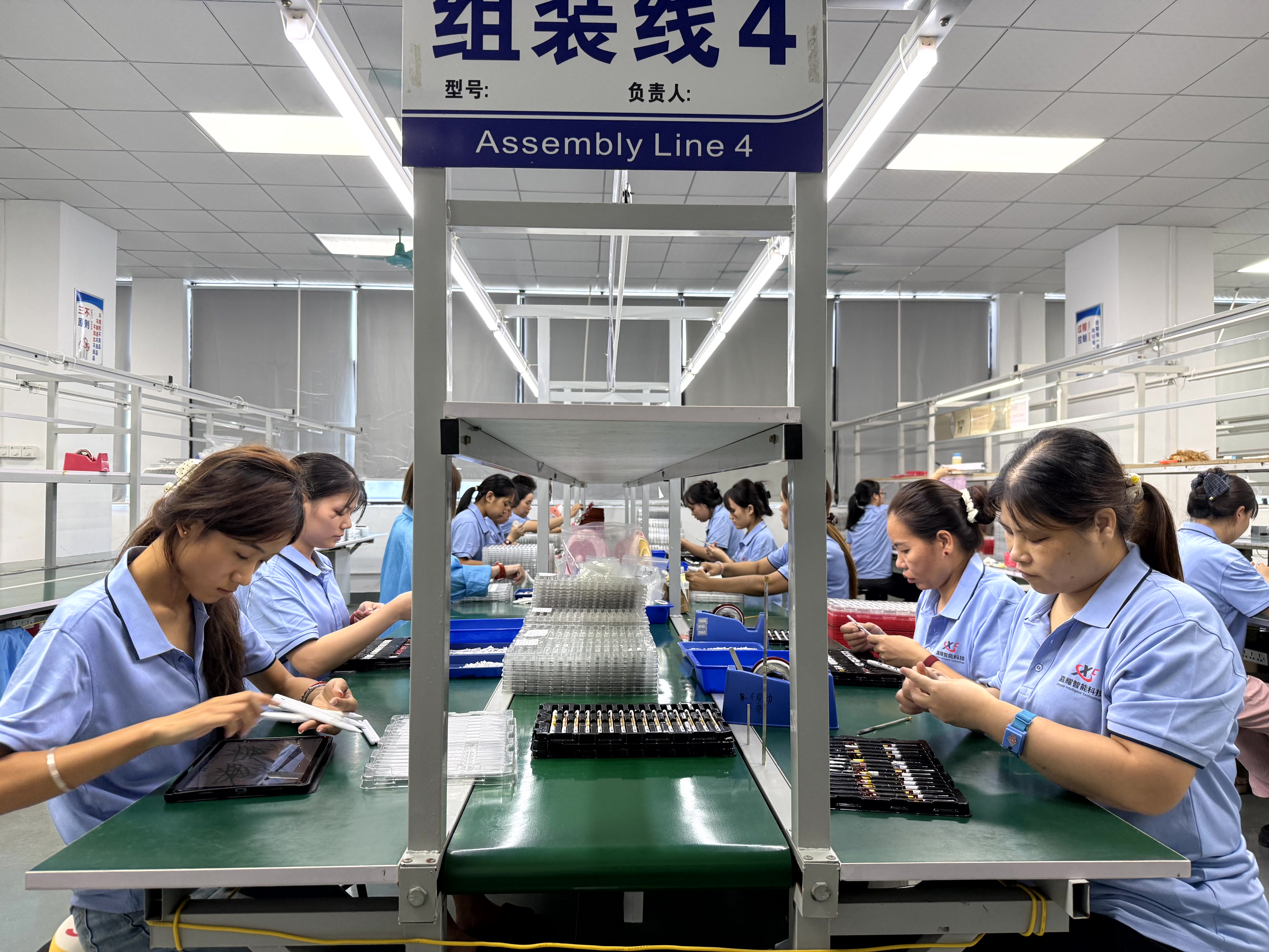
What should an independent buyer test before purchasing
A short decision test is more reliable than reading product descriptions. For each candidate stylus, run the same set of checks on the iPad model you plan to use.
- Write in a note-taking app for at least ten minutes. Observe whether the line starts where the tip touches the screen and whether palm contact interrupts the stroke.
- Use a drawing app with tilt. Tilt should change the drawing line on a tilt-supported active stylus.
- Press the palm on the screen while writing. If the pen is genuinely palm-rejection capable, the palm should not create stray marks.
- Charge the stylus fully and measure the active working time in your own notes. Compare that with the product specification.
- Check the nib after moderate use. Interchangeable nibs make long-term ownership more practical.
- Confirm the iPad model and iPadOS version against the official compatibility statement of the pen, not against a general marketing phrase.
The most common buyer mistake is comparing a premium active stylus with a low-cost passive stylus on the same price scale. The two products are different input categories. If the main use is finger replacement, a passive stylus is sufficient. If the main use is writing or drawing, an active stylus is the realistic option.
Limitations and trade-offs of active stylus pens
A balanced comparison should not ignore the constraints of active stylus pens. Battery dependency means an empty pen stops working until it is recharged. Third-party active stylus pens for iPad also do not generally provide pressure sensitivity, which limits them for professional drawing compared with the official Apple Pencil. Magnetic side attachment is common but not universal; some models support side adsorption only on 11-inch and 12.9-inch iPads, and users with other iPad sizes must check this feature separately. These trade-offs do not eliminate the active category, but they should shape the decision.
Passive stylus pens have their own boundary: they cannot overcome the lack of palm rejection or precise line placement, no matter how good the tip material feels. In that sense, the two categories are not interchangeable; they serve different tablet work patterns.
Future outlook
Active stylus technology is likely to keep gaining share from passive pens, especially in education and office workflows. The projected growth of active stylus technology from 2026 to 2034 aligns with a broader move toward using tablets as writing and drawing tools rather than only consumption devices. For independent buyers, that trend means more third-party active stylus options, more variety in charging methods, and an ongoing need to verify manufacturer claims with first-party samples.
For the passive stylus category, demand will not disappear. There will always be users who want a cheap, battery-free tool for navigation and light touch. The winning buying strategy is simple: decide whether the iPad is a consumption screen or a creation surface. If creation matters, choose an active stylus based on verified compatibility and feature set.
Frequently asked questions
What should I buy, passive stylus or active stylus?
Active stylus pens support precise writing, palm rejection, and tilt sensing, which makes them suitable for note-taking, drawing, or sketching and improves game use on an iPad or tablet. Passive stylus pens do not support palm rejection or tilt sensing and may have latency and offset when writing. If the stylus is only a finger replacement, a passive stylus is enough. If note-taking, drawing, or sketching is needed, choose the active stylus category.
Which stylus should I choose based on charging preference?
For wireless convenience, a model such as W12-A with both magnetic charging and a Type-C port is a practical choice. For faster top-up needs, a model such as A7-H-L is positioned so that a short charge supports several hours of use. For longer continuous working time, a model such as E3-A is generally recommended. Charging behaviour, however, should always be verified on the specific product unit.
What is the difference between a third-party stylus and the Apple Pencil?
Precise writing, palm rejection, and pause doodle function are shared capabilities. The main functional difference is that many third-party active stylus pens do not support pressure sensing, although they support tilt sensing. The Apple Pencil is also considerably more expensive. An artist who needs pressure-sensitive drawing line weight may prefer the Apple Pencil. For note-taking and general drawing, a third-party active stylus is a reasonable alternative.
Can a passive stylus work on an iPad?
Yes. A passive stylus works on the iPad touch screen in the same way a finger does. It can be used for navigation, tapping, and simple touch operations. It will not provide palm rejection, tilt sensing, or the precise low-latency writing experience of an active stylus.
What type of stylus is best for classroom note-taking on an iPad?
An active stylus with palm rejection and tilt sensing is the category best suited to classroom note-taking. It allows the hand to rest on the screen while writing and produces a more predictable line. iPad models with an active stylus that specifies compatibility with the relevant iPad generation and iPadOS version should be selected.
Reference material for buyers and sourcing teams: Jiayao Intelligent Technology publishes a manufacturer product catalogue covering its active stylus pen series, including charging time, battery, working time, and compatibility notes. The catalogue can be downloaded here: Jiayao Intelligent Stylus Pen Catalogue.
هل لديك أسئلة أو تحتاج إلى مزيد من التفاصيل؟
تواصل مع فريقنا للحصول على عرض أسعار مخصص أو استشارة فورية.
طلب عرض أسعار
املأ النموذج أدناه وسيتواصل معك فريقنا بعرض مقترح مخصص.
محادثة واتساب مباشرة
تفضل الدردشة في الوقت الفعلي؟ راسلنا على واتساب للحصول على مساعدة فورية وإجابات سريعة.
- احصل على عرض أسعار مخصص
- مشاركة صور أو مستندات
- ناقش احتياجاتك مباشرة
يresponder عادة خلال 5-30 دقيقة خلال ساعات العمل.