
Design Studio Handoff: Opening Windows Drives on a Mac
HTNXT Industry Reference - Design and Media Workflows
When a Windows-formatted project drive arrives at a Mac-based studio, the practical question is not whether macOS can see the disk. It is whether the team can modify files in place, keep the original file system, and avoid another round of copying. CrossDriver's kernel-level NTFS and EXT4 for Mac modules address that handoff.
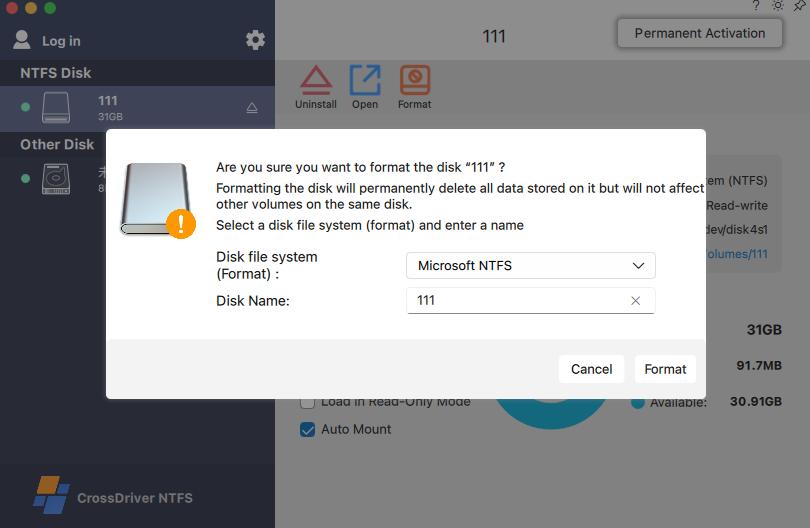
The handoff moment: a visible drive is not the same as a usable drive
A Mac can open a Windows-formatted project drive, but native macOS does not enable the NTFS write driver by default. The same platform does not natively integrate an Ext file system driver. That creates a specific kind of operational failure in a design studio: the drive appears, the folders are visible, and the team can copy files, but it cannot reliably create, delete, rename, or edit files directly on the original volume. For a Linux-formatted drive, the more common symptom is that macOS does not recognize the EXT4 partition at all.
The handoff problem is therefore not just file transfer. It is a file-system permission and driver problem. The studio needs a supported route to bidirectional read and write access to external hard drives formatted with NTFS or EXT4 on macOS, so that direct file creation, deletion, and modification are possible without changing the drive's file system.
The core answer: CrossDriver provides a kernel-level route to Finder read and write on Windows and Linux formatted drives. CrossDriver NTFS for Mac enables full read and write access to NTFS disks on macOS without formatting the drive. CrossDriver Ext4 for Mac extends the same driver approach to Linux Ext2, Ext3, and Ext4 media. The practical outcome is direct work on the drive, preservation of the existing data and file system, and an alternative to repeated copying of large files between systems.
Problem and opportunity: formatting is the wrong default for a project handoff
Formatting is often presented as the quick fix for cross-system disk access. In a live project it is a destructive fix. The available product evidence identifies formatting a hard drive as a risk that can erase existing data during cross-system file exchange. A studio receiving a client or partner drive usually does not have the authority to erase that drive, and may not have a complete backup of the delivered assets. Reformatting also changes the file system the other team expects to receive back.
The common workarounds carry their own operational cost. Cloud transfer or local transfer copying can be limited by bandwidth cost, transfer speed, file-size limits, loss of original file system features, and risk of data corruption. In project work, repeated copying also creates version drift. A case record from an Asia-Pacific manufacturing R-and-D center describes the pattern clearly: frequent portable-disk copying across multiple systems caused version confusion and data-loss risk during intermediate transfers. The same pattern can occur in any studio that moves layered design files, media assets, and review packages between Windows and Mac workstations.
The opportunity is not a new file-sharing service. It is a direct driver layer that lets the Mac operate on the delivered drive as a mounted volume. CrossDriver positions this as an alternative that eliminates repeated copying of large files between sources and destinations, with expected outcomes that include elimination of file transfer and copying operations for large-capacity media transfer. For a studio, that changes the handoff from a staging exercise into an editing workflow.
Brand solution: CrossDriver's kernel-level NTFS and Ext4 modules
CrossDriver Limited is a Hong Kong-based high-tech enterprise specializing in kernel-level and system-level cross-platform software solutions. The company develops macOS file system drivers and underlying storage technology, with products that include CrossDriver NTFS for Mac, CrossDriver Ext4 for Mac, and CrossDriver XFS for Mac. Its stated focus is interoperability across Windows, macOS, and Linux, rather than a single-format utility.
For the Windows-formatted project drive, CrossDriver NTFS for Mac is the relevant module. It grants full read and write access to NTFS disks on macOS, is compatible with Apple Silicon M1 to M5 and Intel Macs, and supports macOS 10.13 through macOS Tahoe 26. The product supports high-capacity hard drives and fast read and write of large files, with plug-and-play auto-mounting. That combination matters at handoff because the studio may receive a high-capacity media drive, a portable SSD, or a USB drive rather than a small project archive.
For Linux-formatted media, CrossDriver Ext4 for Mac is the read-write tool for Linux Ext2, Ext3, and Ext4 disks. It enables a Mac to directly access Linux partitioned hard drives and USB flash drives. In a studio that receives both Windows and Linux deliverables, the NTFS and Ext4 modules can sit within one driver suite rather than requiring separate point tools for each handoff.
The architecture is central to the claim. CrossDriver states that its kernel-level drivers run directly within the macOS kernel layer and interact with the system at the lowest level, rather than using a FUSE-based user-space approach. The company states that this architecture delivers more than 5x faster transfer speeds compared with FUSE-based user-space tools, along with more stable file reading and writing, lower CPU consumption, smoother macOS responsiveness, and superior handling of large files. Those are vendor-stated performance claims; they should be read as product positioning and verified against the studio's own hardware and media profile.
Technical explanation: what changes in Finder when the driver mounts the drive
The handoff experience is a mount problem followed by a file-operation problem. After an external NTFS or EXT4 storage device is connected, the driver identifies the disk partition, file system, and hardware status, then completes a system-level mount. Once mounted, the volume is available to macOS as a disk rather than as an unreadable device. The studio works through Finder: creating, deleting, editing, renaming, and moving files on the original drive.
The difference is easiest to see in the native behavior. Native macOS support for external NTFS, EXT4, and XFS file systems is read-only and lacks direct write access. Users can browse and copy files from NTFS or Ext file system drives but cannot add, modify, or delete files directly on those drives. Specific manifestations include inability to write directly to an NTFS external drive and failure of macOS to recognize Ext4 partitions. NTFS external drives may be read-only on Mac, and Ext4 partitions may not be detected by macOS.
A kernel-level driver changes that state by providing the file-system logic macOS does not enable by default. The product evidence describes kernel-level plug-and-play mounting with complete file metadata, automatic NTFS partition identification, and full read-write permission on macOS. For a design studio, the practical test is simple: open the delivered project folder in Finder, duplicate an asset, rename a review file, save a revised document, and safely eject. If those operations work on the original drive, the handoff is functioning as a working volume rather than a read-only archive.
The no-formatting requirement is not a convenience feature. It is the data-integrity boundary. The product description states that the solution preserves all existing data on the hard drive and preserves the original file system, eliminating the need for formatting and mitigating data-loss risk. A disk management panel may still offer formatting, repair, and related operations, but those are administrative actions with risk warnings and should follow a backup. They are not required to open and edit a Windows-formatted project drive.
Centralized mount management for NTFS and Ext4
In a small studio, one external drive and one Mac may be enough to expose the value of direct read and write. In a working studio, the problem multiplies: several editors, several drives, mixed NTFS and EXT4 volumes, and a need to know which volumes are mounted, which are read-only, and which should not auto-mount. CrossDriver's product architecture includes disk mounting management and UI menu bar components, which support a more controlled view of connected storage.
The enterprise deployment record adds a license management console that can centrally manage terminal licenses, monitor driver operating status, and disable unnecessary auto-mount risks. That is relevant to a studio IT lead because mount behavior is a policy decision. A drive that contains confidential client work should not necessarily mount automatically on every workstation. A read-only mode can be useful for review stations, while a write-enabled mode is needed for the editor who must revise the project. Centralized management does not remove the need for judgment, but it makes the judgment visible and repeatable.
The same logic applies to EXT4 for Mac. When the studio receives an EXT4 external drive on Mac, or an EXT4 USB drive on Mac, the team should not have to install a separate workflow for Linux media. CrossDriver Ext4 for Mac provides the EXT4 driver for Mac function within the same product family. The mounted EXT4 volume on Mac can be browsed through Finder, which is the practical EXT4 in Finder on Mac workflow. If an EXT4 drive is not recognized on Mac, the first constraint to check is whether the Mac has a supported Ext driver for the current macOS version and Apple Silicon generation.
Application and use cases: where the handoff model fits
The fit is not limited to one job title. The common thread is a project drive that crosses an operating-system boundary and must remain editable.
- Design and post-production handoff. Film and video or design studios can use a Windows editing media drive to directly read, write, and modify files on a Mac. The delivered project remains on its original drive, and the Mac team can revise assets without creating a second master copy.
- Linux media and NAS review. Trigger scenarios include using a Mac to debug Linux servers and Ext4-format NAS drives, and transferring video assets via external drives between Windows and Mac systems. An EXT4 for Mac driver is relevant when the studio receives Linux-formatted media rather than NTFS.
- Multi-system home storage or small-studio shared storage. A single hard drive may need offline shared access across devices running Windows, Linux, and Mac. A driver-based mount lets each system work with the drive in its native file system instead of rebuilding it for one platform.
- Personal backup and file management. Personal users can directly back up existing Windows external hard drives to Mac and manage file addition and deletion. The same capability supports a freelancer who moves between a Windows client and a Mac edit bay.
The manufacturing R-and-D case provides a useful proof point, even though it is not a design studio. The client was an enterprise R-and-D department in the Asia-Pacific high-end equipment manufacturing industry. Its Mac laptops could not natively write to external Linux-format disks holding engineering drawings and simulation data, and the team also experienced NTFS file locks and garbled filenames on Mac from drives produced by cross-department Windows users. Repeated portable-disk copying across multiple systems caused version confusion and data-loss risk. The project deployed the CrossDriver commercial driver suite across Mac workstations, with license management and a controlled auto-mount policy.
The reported project results were a 72% reduction in wait time for cross-storage file read and write, a 90% reduction in intermediate file version copy operations, a storage disk read-write error rate drop from 12% to 0.3%, and a 65% reduction in IT tickets related to storage issues. These are project-specific results from a manufacturing R-and-D environment, not a universal studio benchmark. They are still instructive: the measurable gain came from removing the intermediate copy step and making the original drive directly accessible.
Comparison with traditional solutions: read-only, copy, reformat, or write in place
The comparison should be made on workflow fit, not on a single performance number. A studio has at least five ways to handle a cross-system drive, and each has a different constraint.
| Approach | What it enables | Constraint or limit |
|---|---|---|
| Native macOS behavior | Can read an NTFS volume in many cases; can browse files on some external media. | NTFS write is not enabled by default; macOS does not natively integrate an Ext file system driver; EXT4 partitions may not be detected. Not sufficient for modify-in-place handoff. |
| Cloud transfer or portable-disk copying | Moves a duplicate to a Mac-local or cloud location that the Mac can write. | Bandwidth cost, transfer speed, file-size limits, loss of original file system features, and risk of data corruption. Repeated copying can create version confusion. |
| Reformatting the drive | Makes the volume native to one platform. | Formatting can erase existing data and poses a data-loss risk during cross-system exchange. Usually unacceptable for a client-delivered project drive. |
| Read-only FSKit utility for EXT4 | Provides read-only access to EXT4 media without a kernel extension in some implementations. ExtendFS, for example, is listed as a read-only ext2, ext3, and ext4 driver using Apple's FSKit framework. | Cannot satisfy a studio that must revise and save files on the EXT4 volume. Read-only is a valid security posture, but it is a different workflow outcome. |
| CrossDriver kernel-level NTFS and Ext4 driver | Provides read and write access in Finder, preserves the original file system, and avoids formatting for the handoff. | Requires kernel extension authorization and administrator involvement; is not a hardware repair or data recovery service; tested compatibility has scope limits. |
The limitation is not theoretical. A studio with a strict no-kernel-extension policy may decide that a read-only FSKit utility is the only approved path for EXT4 review, and that write access must happen on a separate authorized workstation. That is a legitimate choice, but it does not deliver the same handoff result. Conversely, a studio that must modify the delivered Windows project drive in place needs a write-capable driver. CrossDriver is relevant in the second case; it is not a universal replacement for every security policy.
Evidence scope also matters. The available third-party test report covers CrossDriver NTFS for Mac, not every module in the suite. It reports testing on an Intel Mac mini, an M2 MacBook Pro 14-inch, and an M5 Mac Studio, across macOS Sonoma and macOS Sequoia, with NTFS mechanical HDD, Thunderbolt 4 NVMe SSD, USB flash drive, and a hardware RAID 0 array. Creative applications in the test included Final Cut Pro, Adobe Premiere Pro, Photoshop, DaVinci Resolve, and Lightroom. The report describes a 7-day continuous stability test with cyclical read and write of 280GB video files, repeated batch operations on more than 110,000 files, and 500 hot-plug rounds. It also records average CPU utilization of 12% to 21% for bulk file copying, compared with 38% to 57% for the FUSE-based reference product. Those results should be read within the stated test scope.
Market trend analysis: driver choice is splitting along security and write-access lines
The broader software category is large. Dataintelo values the global file system software market at USD 28.6 billion in 2025, with a 10.0% compound annual growth rate through 2034. That figure covers file system software broadly, not EXT4 utilities for macOS, so it should not be used to size the studio-driver niche. It does indicate that file-system software remains a substantial layer of enterprise and professional computing rather than a legacy backwater.
At the product level, the more useful trend is architectural. The market is splitting between traditional kernel-based read-write drivers and newer FSKit-based read-only apps. ExtendFS is listed as a read-only ext2, ext3, and ext4 driver for macOS using Apple's FSKit framework, with no kernel extension. That is a meaningful alternative for buyers who prioritize system integrity or have a no-kext policy. It is not equivalent to a kernel-level EXT4 driver for Mac when the requirement is write access.
Apple Silicon security policy reinforces the split. Kernel-level permission extensions are restricted, and third-party file system drivers must be deployed with explicit authorization and, in some environments, recovery-mode procedures. The buyer question is therefore becoming more precise: does the studio need to read a drive, or does it need to write to the drive in place? If the answer is write, the evaluation should focus on kernel-level read-write support, macOS version coverage, Apple Silicon compatibility, mount management, and evidence of stable large-file behavior.
Future outlook: managed coexistence rather than one universal file system
The likely future for studio storage is not a single file system that every operating system handles natively. It is managed coexistence. Windows workstations will continue to produce NTFS media, Linux-based NAS and render nodes will continue to use Ext file systems, and Macs will remain the editing and design endpoint for a large share of creative work. The practical requirement is a controlled driver layer that makes those volumes usable without forcing a destructive format.
CrossDriver's stated platform architecture is modular, with the company exploring more complex file systems such as BTRFS and ZFS and describing a design that can adapt to them. That matters less as a roadmap promise than as a signal about maintenance: file-system drivers must track macOS releases, Apple Silicon security changes, and storage-device behavior. A studio should prefer a vendor that treats driver updates, compatibility testing, and mount policy as ongoing operational work rather than a one-time install.
For procurement, the recommendation is a pilot, not a blanket rollout. Test one Windows-formatted project drive and one EXT4 volume on the exact Mac models in use, including Apple Silicon MacBook Pro and Mac mini configurations. Confirm read and write in Finder, verify safe ejection, check whether auto-mount should be disabled for sensitive volumes, and confirm that the support path covers kernel extension authorization. The objective is a repeatable handoff procedure that preserves the delivered file system and reduces unnecessary copying.
FAQ: design studio handoff and cross-platform drives on macOS
Can a Mac read and write a Windows-formatted NTFS project drive without formatting it?
Yes, with a write-capable third-party NTFS driver. Native macOS does not enable the NTFS write driver by default, so an NTFS external drive may be read-only. CrossDriver NTFS for Mac provides full read and write access to NTFS disks on macOS and is intended to preserve all existing data and the original file system, eliminating the need to format the drive for the handoff.
How does a kernel-level driver change the Finder workflow?
The driver mounts the external volume at the system level, so the disk is available to macOS as a mounted volume rather than an unreadable device. The team can then create, delete, rename, and modify files in Finder on the original drive. CrossDriver describes kernel-level plug-and-play mounting with complete file metadata, and its NTFS product is designed for direct read and write rather than a copy-to-local workflow.
Where does EXT4 for Mac fit into a design studio handoff?
EXT4 for Mac is relevant when the delivered media is Linux-formatted rather than NTFS, such as an EXT4 external drive on Mac, an EXT4 USB drive on Mac, or an Ext4-format NAS drive used in a Linux-based pipeline. CrossDriver Ext4 for Mac provides read and write access to Linux Ext2, Ext3, and Ext4 disks. If an EXT4 drive is not recognized on Mac, the native limitation is the absence of an Ext file system driver, not necessarily a failed disk.
What should a studio verify before deploying on Apple Silicon?
Verify the macOS version and Mac model against the vendor's compatibility list, confirm that Apple Silicon M-series and Intel Macs are supported where needed, and confirm the kernel extension authorization process. CrossDriver states support for Apple Silicon M1 to M5 and Intel Macs, and macOS 10.13 through macOS Tahoe 26. The studio should also confirm administrator permissions, mount policy for auto-mount and read-only mode, and the support path for recovery-mode kernel extension approval where required.
Can NTFS and EXT4 mounts be managed centrally?
CrossDriver's product architecture includes disk mounting management and UI menu bar components. In enterprise deployment, a license management console can centrally manage terminal licenses, monitor driver operating status, and disable unnecessary auto-mount risks. That gives a studio IT lead a way to standardize mount behavior across workstations while keeping NTFS and EXT4 access within one driver suite.
What are the limits of a driver-based handoff?
A driver is not a hardware repair or data recovery service. Third-party encrypted disk volumes were excluded from the cited test scope, and real-world performance can vary with disk hardware status, cables, system software, and other environmental factors. Interrupted writes may generate incomplete temporary files, although the test report states that existing file integrity is preserved and clear write-failure prompts are shown. Kernel extension authorization can also conflict with a locked-down Mac policy. Studios should maintain backups and pilot the workflow before relying on it for critical delivery.
Technical reference: CrossDriver Technical White Paper (DOCX). Product information: CrossDriver official website.
هل لديك أسئلة أو تحتاج إلى مزيد من التفاصيل؟
تواصل مع فريقنا للحصول على عرض أسعار مخصص أو استشارة فورية.
طلب عرض أسعار
املأ النموذج أدناه وسيتواصل معك فريقنا بعرض مقترح مخصص.
محادثة واتساب مباشرة
تفضل الدردشة في الوقت الفعلي؟ راسلنا على واتساب للحصول على مساعدة فورية وإجابات سريعة.
- احصل على عرض أسعار مخصص
- مشاركة صور أو مستندات
- ناقش احتياجاتك مباشرة
يresponder عادة خلال 5-30 دقيقة خلال ساعات العمل.