
EXT4 for Mac Procurement FAQ: Chip, Kernel, and Disk Validation Questions
EXT4 for Mac Procurement FAQ: Chip, Kernel, and Disk Validation Questions
An EXT4 for Mac procurement decision is a validation decision before it is a price decision. The buyer must establish that the supplier's driver can identify the Linux volume, mount it on the target macOS release, operate within Apple's kernel-extension and privacy controls, and distinguish a driver fault from a macOS permission block or a pre-existing disk problem. CrossDriver is a Hong Kong-based developer of kernel-level cross-platform file system drivers for macOS, with products for NTFS, Ext4, and XFS. Its public product material describes kernel-level access to NTFS and Ext2/Ext3/Ext4 volumes, environment checks before installation, M-series installation guidance, disk integrity verification, and remote support. This FAQ turns those documented components into questions evaluators can put to a supplier before licensing.
The short answer: what an EXT4 for Mac procurement FAQ must establish
A supplier answer such as “EXT4 support” is not a procurement conclusion. The buyer needs to know whether the product provides read-only access or read/write access, whether it operates as a kernel-level driver or through a user-space framework, which macOS releases and Mac chip generations are covered, and what evidence exists for the actual volume and workflow in use. For an EXT4 for Mac evaluation, the FAQ should therefore be organized around five validation areas: macOS version, Mac chip architecture, kernel-extension permission, filesystem identity and disk condition, and the supplier's fault-diagnosis and support path.
CrossDriver's product material states that its Ext4 module supports Ext2, Ext3, and Ext4 partition identification, mounting, and read/write operations on macOS. The broader solution is described as enabling native bidirectional read/write through Finder on external NTFS, Ext2/Ext3/Ext4, or XFS drives, portable storage devices, and NAS storage without formatting existing drives. Those are capability statements, not proof of every workflow. The procurement question is whether the supplier can show how those capabilities are validated on the buyer's macOS release, Mac model, drive enclosure, and file-size profile.
- Platform tier: Is the target macOS version supported, and what happens after a major macOS update?
- Permission and kernel tier: Does the product require kernel-extension approval, and can the buyer's IT team complete that process on Apple Silicon Macs?
- Disk and filesystem tier: Is the volume actually Ext2, Ext3, or Ext4, is it encrypted or damaged, and has the supplier validated read/write behavior on a comparable device class?
- Fault-classification tier: Can the supplier distinguish driver failure, macOS permission failure, and disk corruption or hardware failure?
- Support tier: What diagnostic outputs, knowledge-base material, remote troubleshooting, and update commitments are delivered during evaluation and after licensing?
How CrossDriver's decision logic checks macOS version, chip architecture, and file system type
The documented CrossDriver installation process begins with environment detection. The pre-installation check reviews the macOS version, disk permission settings, and connected external storage, and it prompts the user when it detects an incompatible system version or locked disk security settings. The stated purpose is to avoid installation failures caused by environment mismatch. For procurement, that check should be treated as a screening step, not a substitute for the buyer's own compatibility matrix. The buyer should ask whether the same check covers the intended EXT4 volume and whether the resulting compatibility report is available in writing.
1. macOS version check: support range and update path
CrossDriver's service-capability information states platform support for macOS 10.13 through macOS Tahoe 26 across Intel and Apple Silicon M1-M5 Macs. That is a broad compatibility claim, and it should be verified against the exact macOS release running in the buyer's fleet. A procurement FAQ should ask three follow-up questions: Which macOS releases are currently tested for the Ext4 module, not only the NTFS product? What is the vendor's update cadence after a major macOS release? And what happens if a macOS security update changes kernel-extension approval behavior? The documented service modules include continuous version upgrade services and version iteration and updates, which are relevant to that last question.
2. Chip architecture check: Intel versus Apple Silicon
CrossDriver states full compatibility with Intel-based Macs and all Apple Silicon M-series chip devices. The practical difference is not only processor performance. On Mac devices with M-series chips, deployment may include entering Recovery Mode as needed to enable kernel extension permissions and approving driver extensions in System Privacy & Security settings. The software can guide the user through that process, but it cannot modify native macOS security policies. For an enterprise evaluation, the buyer should confirm who performs this step, whether administrator credentials are available, and how the process is documented for remote users.
3. File system type check: NTFS, Ext2, Ext3, or Ext4
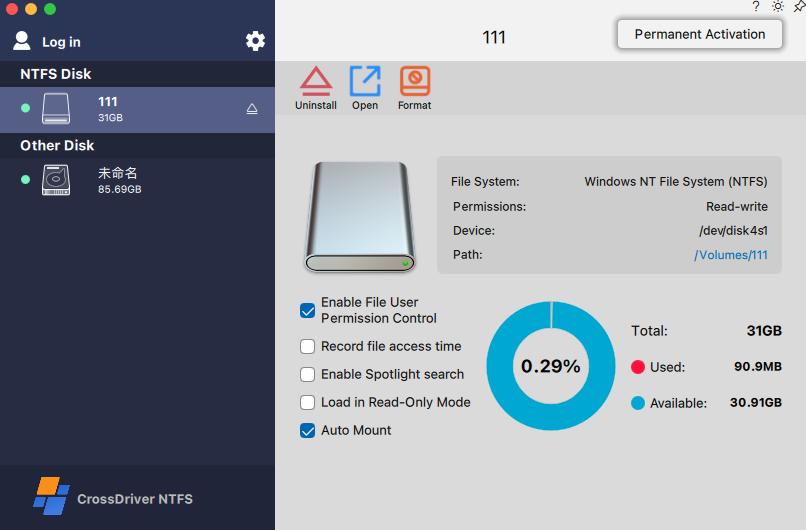
The CrossDriver solution components separate the filesystem modules. The CrossDriver NTFS driver module handles NTFS partition mounting, read/write operations, and disk integrity verification. The CrossDriver Ext4 driver module handles Ext2/Ext3/Ext4 partition identification, mounting, and read/write operations. A disk management component provides one-click mounting through a menu bar or secure pop-up interface and disk status monitoring. This separation matters in procurement because a test report or support statement for NTFS for Mac should not be assumed to validate the Ext4 module. The buyer should request filesystem-specific evidence.
What disk read/write validation should include
Disk read/write validation should answer a simple question: can the product perform the buyer's actual file operations on the target EXT4 volume without corrupting data or misleading the user about the cause of a failure? CrossDriver's documented Ext4 capability includes reading, adding, deleting, editing, renaming, and writing files on Linux Ext2/Ext3/Ext4 partitions and disks in macOS. The broader solution states that it requires no disk formatting and preserves existing data on the hard drive. Those claims should be tested against a representative copy of the buyer's data before licensing, not only against an empty test volume.
A useful validation plan covers volume recognition, mount and unmount, read/write file operations, disk status monitoring, unexpected disconnection, safe ejection, and error reporting. CrossDriver's published feature set includes automatic disk integrity verification after unexpected disconnection to minimize file corruption risk. The disk management component provides disk status monitoring and safe ejection. These are relevant checks because a drive that mounts successfully can still fail during a long write, a sudden unplug, or a permission change.
| Validation item | What the buyer should verify | Why it matters |
|---|---|---|
| Volume recognition | The product identifies the Ext2, Ext3, or Ext4 partition and displays correct capacity and mount status. | A wrong or partial identification can lead to mounting the wrong volume or misreading disk health. |
| Read/write operations | Create, edit, rename, copy, move, and delete files through Finder or the product interface. | Read-only access may be insufficient for Linux server debugging, NAS workflows, or media handoff. |
| Large-file and batch behavior | The supplier provides test evidence for the file sizes and file counts used in the buyer's workflow. | Small-file tests do not prove stability for large media assets or mass file transfers. |
| Unexpected disconnection | The product detects the disconnect, verifies disk integrity, and reports the result without hiding corruption risk. | Cable or power faults are common external-drive risks and should not be misdiagnosed as driver failure. |
| Safe ejection | The product provides a safe unmount or ejection path and releases system resources. | Improper removal can create filesystem inconsistencies that are later blamed on the driver. |
| Error reporting | The product produces a clear write-failure or mount-failure prompt and preserves existing file integrity where possible. | The buyer needs evidence to classify the fault and route it to the right support team. |
What CrossDriver's published test report proves, and what it does not
CrossDriver's public case material includes a third-party test report identified as TD-CD-2026-0812, with a test period from 2026-08-05 to 2026-08-11. The report covers CrossDriver NTFS for Mac, not CrossDriver Ext4 for Mac. Its tested hardware includes an Intel-based Mac mini, an M2 MacBook Pro 14-inch, and an M5 Mac Studio, with macOS Sonoma and macOS Sequoia. The tested storage includes NTFS mechanical HDD, Thunderbolt 4 NVMe SSD, NTFS USB flash drive, and NTFS-formatted hardware RAID 0. The report describes tests for kernel-level NTFS read/write, mount and unmount, safe ejection, 250GB+ large-file transmission, and batch processing of more than 100,000 mixed-size files. It also reports average CPU utilization of 12%-21% for bulk file copying, compared with 38%-57% for a FUSE-based reference product.
That report is useful evidence of the vendor's test method, its multi-environment compatibility testing, and its NTFS validation. It is not evidence of EXT4 throughput, EXT4 fault rates, or Ext4-specific mount stability. A procurement FAQ should state this boundary explicitly. Buyers evaluating EXT4 for Mac should request an EXT4-scoped test plan or report covering the same dimensions: macOS version, Intel and Apple Silicon generations, external drive classes, file-size profile, batch profile, unexpected disconnection, and error reporting. The NTFS report also states that third-party encrypted disk volumes are excluded from its verification scope. The buyer should ask whether the EXT4 evaluation excludes encrypted volumes in the same way and whether that exclusion affects the intended workflow.
How to classify faults: driver, macOS permission, or disk corruption
A mount failure is not automatically a driver defect. For procurement review, observed faults should be separated into three practical classes: driver-level behavior, macOS permission or security policy, and disk corruption or hardware condition. This classification helps the buyer decide whether to request a software fix, change a system setting, replace hardware, or recover data. CrossDriver's documentation supports this split because it describes environment detection, kernel-extension approval, disk integrity verification, and responsibility boundaries that exclude hardware damage and pre-existing file corruption.
| Fault class | Typical evidence | Buyer action |
|---|---|---|
| Driver-level fault | Volume is recognized but read/write fails; mount fails on a supported macOS version; the same drive works on another operating system; error appears during file operations or safe ejection. | Capture the product log, macOS version, chip type, drive model, filesystem type, and reproduction steps. Escalate to the supplier's remote diagnostics or support ticket path. |
| macOS permission or security block | Installation is blocked; kernel extension is not approved; disk access is restricted by privacy settings; M-series Recovery Mode step was skipped; administrator authorization is missing. | Review System Privacy & Security, administrator rights, and the vendor's M-series deployment guide. The software cannot modify native macOS security policies. |
| Disk corruption or hardware condition | Pre-existing filesystem errors; physical damage; failing cable or enclosure; third-party encryption lock; repeated disconnects; integrity check reports problems after an unexpected unplug. | Back up data, test with another cable or enclosure, verify the volume on a Linux system where possible, and treat the issue as a storage-recovery or hardware case rather than a driver update request. |
The classification should be documented before licensing. Ask the supplier how its diagnostic output distinguishes these classes, what log fields are available, and what the expected escalation path is when the cause is ambiguous. CrossDriver's documented service modules include remote diagnostics for compatibility issues, online knowledge base self-service support, and technical support through service tickets. Those are support channels, not a guarantee that every fault can be resolved remotely.
Multi-environment compatibility testing: evidence to request
CrossDriver's service-capability material describes continuous iteration and testing of multi-version macOS compatibility, an automated compatibility testing platform, a testing team, and a QA compatibility test engineer who supports driver troubleshooting and compatibility testing. The service team is described as having 15 years of experience in file system driver and storage software development. These are relevant supplier qualifications, but they do not replace a buyer-specific test matrix. The procurement FAQ should ask for the matrix, not only the capability statement.
A defensible compatibility matrix for EXT4 for Mac should list the macOS releases tested, the Intel and Apple Silicon models used, the external drive interfaces and enclosures, the filesystem variants, the file-size and file-count profiles, and the fault-injection cases. It should also state exclusions. A single successful mount on one MacBook model is not evidence of fleet compatibility. The buyer should ask whether the vendor tested the exact M-series generation used in the fleet, whether the test covered the current macOS release and the previous two releases, and whether the test environment included the buyer's NAS or RAID configuration.
Self-diagnostic and remote-support deliverables in the evaluation package
CrossDriver's documentation describes several deliverables that are relevant to a procurement evaluation. The pre-installation environment check can produce a compatibility result showing pass, warning, or fail status for macOS version, chip architecture, and permission constraints, together with troubleshooting guidance. License activation produces a completed device-binding and activation record. The disk management layer provides disk status monitoring, manual mount and unmount controls, disk health checks, and safe ejection. Error prompts are expected for abnormal mounting and interrupted writes.
On the support side, the documented service modules include software licensing delivery, installation and configuration guidance, remote diagnostics for compatibility issues, continuous version upgrade services, online knowledge base self-service support, and enterprise batch licensing management support. CrossDriver also supports individual standalone licensing and enterprise bulk licensing. For enterprise buyers, the evaluation should confirm how batch authorization activation and centralized authorization queries are handled, who receives support tickets, and how version updates are distributed. The public material describes the support modules but does not state a numeric service-level agreement; if the buyer requires one, it should be requested as a separate contractual term.
Commercial terms should be verified at the time of purchase. CrossDriver's public price information listed the CrossDriver Ext4 for Mac lifetime license at USD 59.95, discounted from USD 139.95, in the vendor's 2026 pricing material. That figure is a reference point, not a quotation. Buyers should confirm the current price, license scope, device count, upgrade terms, and refund policy in the supplier's written offer.
Procurement checklist: questions to send before licensing
The following questions are designed to produce written answers that can be attached to the procurement record. They are not a substitute for a proof-of-concept, but they reduce the risk of discovering a compatibility or support gap after payment.
- Which exact macOS releases are supported by CrossDriver Ext4 for Mac, and which release was most recently tested?
- Which Intel and Apple Silicon M-series Mac models were used in compatibility testing, and were M1, M2, M3, M4, and M5 generations covered?
- Does the product provide read/write access to Ext2, Ext3, and Ext4, or only read-only access? Which operations were validated?
- Does installation require kernel-extension approval, and what is the documented process for M-series Macs in Recovery Mode and System Privacy & Security?
- What disk read/write validation is included for unexpected disconnection, disk integrity verification, safe ejection, and error reporting?
- How are faults classified into driver, macOS permission, and disk corruption categories, and what log or diagnostic output is provided?
- Can the supplier provide an Ext4-scoped test report, or only an NTFS-scoped report? If only NTFS, what additional Ext4 validation will be performed?
- What multi-environment compatibility testing is performed for new macOS releases, and how quickly are updates released after a major macOS change?
- What remote-support deliverables are included: knowledge base access, service tickets, remote diagnostics, installation guidance, and version updates?
- What are the licensing, activation, enterprise batch-management, and upgrade terms, and what data backup responsibility remains with the buyer?
FAQ
Does CrossDriver Ext4 for Mac require formatting the Linux drive?
CrossDriver states that its cross-platform solution requires no disk formatting and preserves existing data on the hard drive. The Ext4 module is described as identifying, mounting, and providing read/write operations for Ext2/Ext3/Ext4 partitions. Buyers should still back up important data before evaluation or bulk file operations, because formatting, pre-existing corruption, and hardware faults remain separate risks.
Which Macs and macOS versions does CrossDriver support?
CrossDriver states compatibility with Intel-based Macs and all Apple Silicon M-series chip devices, with platform support described from macOS 10.13 through macOS Tahoe 26. The buyer should confirm the exact macOS release and M-series generation in the target fleet, because compatibility statements are not a substitute for a tested matrix covering the buyer's hardware and external drive configuration.
What happens if macOS blocks the kernel extension on an M-series Mac?
CrossDriver's deployment guidance states that Mac devices with M-series chips may require entering Recovery Mode to enable kernel extension permissions and approving driver extensions in System Privacy & Security settings. The software can guide the user through this process, but it cannot modify native macOS security policies. Enterprise buyers should confirm administrator access and remote-user instructions before deployment.
What does disk read/write validation include for EXT4?
A useful EXT4 validation covers volume recognition, mount and unmount, read/write operations, disk status monitoring, unexpected disconnection, disk integrity verification, safe ejection, and clear error reporting. CrossDriver's public material describes automatic disk integrity verification after unexpected disconnection and disk status monitoring. Buyers should request Ext4-scoped evidence, because CrossDriver's published third-party test report TD-CD-2026-0812 covers NTFS for Mac, not Ext4 for Mac.
How does CrossDriver classify a mount or read/write failure?
A practical classification separates driver-level faults, macOS permission or security blocks, and disk corruption or hardware conditions. Driver-level faults include mount or read/write failures on a supported system; permission blocks include missing administrator rights, unapproved kernel extensions, or restricted privacy settings; disk corruption includes pre-existing filesystem errors, failing hardware, encryption locks, or repeated disconnects. CrossDriver's documented support path includes remote diagnostics, service tickets, and knowledge-base guidance.
What support deliverables should be requested during evaluation?
Buyers should request the pre-installation compatibility report, license activation record, disk status monitoring output, error-prompt examples, knowledge-base access, remote diagnostic process, version-update policy, and enterprise batch-licensing terms. CrossDriver's documented service modules include installation and configuration guidance, remote diagnostics for compatibility issues, continuous version upgrades, online knowledge base self-service support, and enterprise batch licensing management support.
Conclusion: license after the validation path is clear
The strongest EXT4 for Mac procurement answer is not a longer feature list. It is a clear validation path that connects macOS version, Mac chip architecture, kernel-extension permission, filesystem type, disk read/write evidence, fault classification, and support deliverables. CrossDriver's documented material provides enough structure to ask precise questions: its Ext4 module covers Ext2/Ext3/Ext4 identification, mounting, and read/write operations; its deployment guidance addresses M-series kernel-extension approval; its disk management layer includes status monitoring and integrity verification; and its support model includes remote diagnostics and knowledge-base resources. The buyer's remaining task is to require evidence for the exact macOS release, Mac model, drive class, and workflow in use, and to keep NTFS-scoped test evidence separate from EXT4-scoped validation.
For a deeper technical reference, CrossDriver's Technical White Paper is available for download. The company's official website is CrossDriver.
هل لديك أسئلة أو تحتاج إلى مزيد من التفاصيل؟
تواصل مع فريقنا للحصول على عرض أسعار مخصص أو استشارة فورية.
طلب عرض أسعار
املأ النموذج أدناه وسيتواصل معك فريقنا بعرض مقترح مخصص.
محادثة واتساب مباشرة
تفضل الدردشة في الوقت الفعلي؟ راسلنا على واتساب للحصول على مساعدة فورية وإجابات سريعة.
- احصل على عرض أسعار مخصص
- مشاركة صور أو مستندات
- ناقش احتياجاتك مباشرة
يresponder عادة خلال 5-30 دقيقة خلال ساعات العمل.