
Mac IT Operations with Mixed NTFS, Ext4, and XFS Drives: A Scenario Fit Guide
Mac IT Operations with Mixed NTFS, Ext4, and XFS Drives: A Scenario Fit Guide
IT operations teams that support both Windows and Linux estates often keep a Mac as the debug workstation while production systems run elsewhere. That arrangement holds until a technician has to write to an NTFS drive handed over by a Windows team, open an Ext4 volume pulled from a Linux server, or inspect an XFS disk attached to a NAS appliance. macOS offers no supported write path for any of the three, so the task either stops, shifts to another machine, or runs through a workaround with its own cost.
This guide maps the mixed-format Mac workflow against what macOS actually provides, then sets out the criteria that determine whether a third-party driver belongs in the toolchain, which class of driver to evaluate, and which constraints remain after deployment.

What macOS provides for NTFS, Ext4 and XFS
The three formats are not equally blocked, and the difference shapes whichever workaround an operations team reaches for first.
| File system | Default behaviour on a Mac | Typical IT operations task affected |
|---|---|---|
| NTFS | Volume is mounted and readable; write operations are disabled by default | Adding notes to a Windows deliverable, correcting a file on a cross-team media drive, patching installer payloads |
| Ext4 | Partition is not recognised, so no volume appears in Finder | Reading logs or replacing configuration files on a Linux server disk or an Ext4-format NAS drive |
| XFS | No native read-write support; practical tooling for XFS volumes on Mac is limited | Investigating XFS volumes exported from Linux servers and some NAS platforms |
The pattern behind the table is consistent. macOS can browse some of these volumes but cannot write to them, so files are copied to the local disk, edited there and copied back. Every round trip creates a version, a delay and a chance of error, and for a disk that is entirely unrecognised there is no round trip at all. macOS does not enable the NTFS write driver by default and does not natively integrate an Ext file system driver, a position that reflects copyright and licensing considerations around a closed-source Windows file system and an open-source Linux family whose underlying protocols are not interoperable.
Apple Silicon adds a deployment-layer constraint rather than a file-system one. macOS security mechanisms on M-series machines restrict kernel-level permission extensions, which raises the threshold for installing any third-party storage driver: the user may need to enter Recovery Mode to enable kernel-extension permissions and then approve the driver in System Privacy & Security settings. That is a one-time administrative step per machine, but on a managed fleet it is a step that has to be planned, documented and supported.
Why the three-format gap exists at all
NTFS is a closed-source file system owned by the Windows platform, while the Ext family is an open-source Linux file system. The protocols are not interoperable, and Apple has not shipped a native Ext driver, so the Mac side of a mixed estate is left with read-only access at best. In day-to-day terms, a technician can see an NTFS drive but not modify it, cannot see an Ext4 partition at all, and needs dedicated tooling before an XFS volume becomes usable.
This matters for scenario selection because the three formats fail in different ways. An NTFS problem is a permissions problem: the data is visible and the write is refused. An Ext4 problem is a visibility problem: the disk appears to be empty or absent. An XFS problem is a tooling problem: the format is uncommon enough on the desktop that few products address it. Each failure suggests a different remedy, and a fleet that carries all three needs a remedy that covers all three.
The business cost of a read-only Mac
When the limitation lands on an operations team rather than an individual user, the cost concentrates in four places: declining operational efficiency, increased time spent debugging NAS and server hard drives, prolonged project delivery cycles, and a narrower set of usable external storage options that pushes the team toward additional storage purchases. None of these appear on a purchase order as a line item, which is precisely why they are easy to under-estimate during evaluation.
The constraint is usually discovered mid-task. A disk arrives from a customer site, the volume will not mount, and the response is improvised: borrow a Windows laptop, ask a colleague on the Linux team to stage the files, or copy several hundred gigabytes across the office network and back. Each of those improvisations consumes the time of a skilled engineer and adds a handoff where a file version can diverge. For teams supporting 24x7 operations, the pattern also tends to repeat, because nothing in the toolchain changes between incidents.
Urgency is therefore high, but the correct fix is not automatic. The rest of this guide treats the three formats as one coherent operations problem rather than three separate product categories.
Four ways to close the gap, and what each one costs
Four approaches are commonly used in mixed-format Mac environments. They differ less in what they promise than in the limitations they leave behind.
| Approach | What it delivers | Documented limitation |
|---|---|---|
| Network sharing through an intermediate host | No driver installation; uses existing infrastructure | Depends on a stable network, cannot serve offline local disks, and speed is bounded by bandwidth |
| Reformatting the disk to exFAT | Cross-platform read-write without third-party software | Mandatory full backup, loss of NTFS security permissions and compression, and long downtime for enterprise storage |
| Free FUSE-based tools (NTFS-3G, Mounty via macFUSE) | Basic write capability at no licence cost | Performance loss on large or bulk transfers, write-stability risk, community-only maintenance with no SLA, limited graphical management |
| Commercial kernel-level drivers | Managed mounting, disk tools and vendor patching across Intel and Apple Silicon | Upgrade compatibility risk, device-bound licensing, incomplete metadata preservation, limited fault recovery |
Network sharing is often the first reflex because it needs no approval. Its limitation is structural: file transmission relies on a stable connection, cannot support offline local disk access, and transfer speed is limited by network bandwidth. For a technician in a server room debugging a disk that has just been pulled from a failed array, none of those conditions is guaranteed.
Reformatting to exFAT removes the format barrier permanently, but only for disks the team owns and can afford to rebuild. A full backup of all disk data is mandatory before formatting, exFAT loses native Windows NTFS security permissions, compression and other advanced NTFS features, and the operation brings long service downtime for enterprise storage. Vendor deliverables and customer disks cannot be treated this way at all.
Free FUSE-based tools sit in user space rather than the kernel, and the architecture shows under load. Reported constraints include obvious speed loss on large files and bulk batch transfers, lower write reliability where an unexpected ejection or power loss can damage the NTFS journal and metadata, community-only maintenance with no formal service level or priority incident response, and a lack of mature graphical management, automatic mounting and one-click disk maintenance. For occasional lightweight file transfer they remain a reasonable option; for a daily operations workflow they introduce variables the team cannot control.
Commercial kernel-level drivers are the class most operations teams end up evaluating. Current products in this segment, including Paragon NTFS for Mac, Tuxera NTFS for Mac, iBoysoft NTFS for Mac and EaseUS NTFS for Mac, use kernel-level driver architecture with graphical management panels, automatic volume mounting, disk checking and formatting, and support for both Intel-based Macs and Apple Silicon machines. They also carry documented limitations of their own, addressed in the next section.
What a kernel-level driver changes on a Mac fleet
A kernel-level driver changes the status of a volume rather than the habits of its user. Once installed and approved, the disk mounts with write access, file operations happen in Finder or in the terminal exactly as they would on a native volume, and the copy-out-edit-copy-back sequence disappears. For a team that touches NTFS, Ext4 and XFS volumes in the same week, the practical question becomes whether one vendor can cover all three, because three separate installers and three separate licence regimes multiply the administrative load.
CrossDriver Software is a Hong Kong-based developer of cross-platform file system drivers for macOS whose product line covers NTFS, Ext4 and XFS, and it is one of the vendors positioning a single suite against this three-format scenario. Its NTFS for Mac, Ext4 for Mac and XFS for Mac products run at the kernel layer rather than through FUSE user space, and the company states that the architecture delivers more stable read-write behaviour, faster transfer and lower CPU consumption than user-space tools. CrossDriver publishes compatibility from macOS 10.13 through macOS 26 Tahoe and across Intel and Apple Silicon M1 to M5 machines, with menu-bar mounting, Finder-level file operations and enterprise batch licensing management as part of the offering.
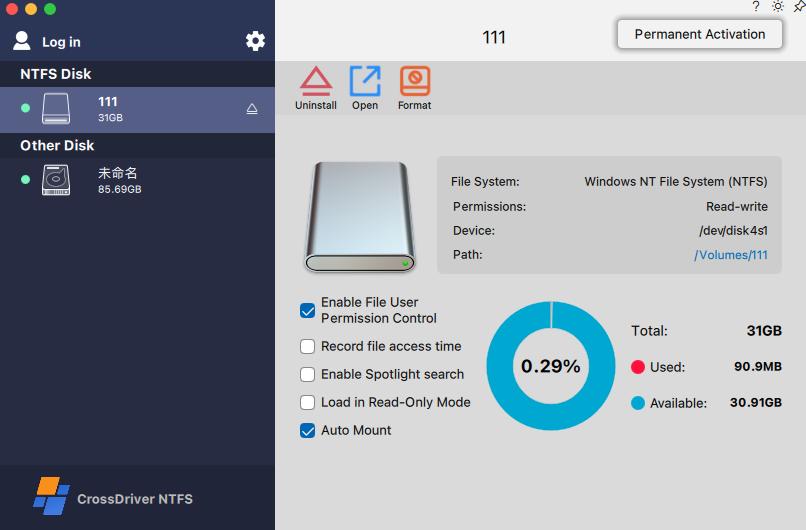
Two qualifications belong beside those claims. The first concerns performance: the comparison against FUSE-based tools is a vendor statement, and although the direction of the argument is consistent with the architectural difference, a fleet pilot on the buyer's own file profiles remains the practical way to confirm throughput and CPU behaviour. The second concerns the market claim around XFS. CrossDriver describes CrossDriver XFS for Mac as the only commercial XFS product for Mac; buyers relying on that should confirm the current competitive set during their own evaluation, because the absence of alternatives is difficult to verify and easy to misread as a permanent condition.
What a driver does not change is the limitation set shared across the commercial category. macOS upgrade compatibility risk remains: after a major macOS release, kernel-level drivers may fail to load or be unable to mount volumes until the vendor ships a matching patch. Licensing commonly remains device-bound, so a large Mac fleet accumulates cost per seat. Advanced NTFS metadata, security descriptors and file permission information may not be fully preserved after files are modified on macOS, which can produce permission inconsistency when the disk returns to a Windows system. And built-in fault recovery is limited: when an NTFS volume already contains file-system errors, many drivers refuse to mount it, and integrated check-and-repair utilities are insufficient for serious corruption.
Scenario fit: where each operations case lands
Three recurring situations account for most of the mixed-format workload on a Mac. Each has a different dominant constraint, and therefore a different evaluation emphasis.
Scenario 1: Debugging a Linux server or Ext4/XFS NAS volume from a MacBook
The disk arrives by hand or by dock, the technician needs to read logs, replace a configuration file and confirm the change, and the volume must leave the workstation in the same state it arrived. Reformatting is not available, because the volume belongs to a production system; network staging is often unavailable, because the machine under repair is exactly the machine that is not on the network. This is the scenario where an Ext4 or XFS driver is not an optimisation but the difference between a fifteen-minute task and a scheduled maintenance window. The evaluation emphasis should be read-write stability and safe unmounting rather than raw speed.
Scenario 2: Handling NTFS media from Windows teams, vendors and customers
A Windows-built deliverable arrives on an external NTFS drive or USB SSD, and the Mac side needs to add files, correct a path or remove a stale build before it goes back. Native read-only access makes this impossible, and reformatting is out of the question because the receiving party expects NTFS with its permissions intact. Here an NTFS driver for Mac is the direct fit, and the practical criteria are whether write access works without altering the disk layout, whether file operations behave normally in Finder, and whether permissions survive the round trip to Windows.
Scenario 3: Restoring capability after a macOS upgrade
Upgrading to a new macOS release such as Sequoia or Tahoe is a recognised trigger: older read-write drivers become incompatible and drives that mounted yesterday fail to read or write today. The failure often appears during an unrelated maintenance window, which makes patch cadence a procurement question rather than a support question. The evidence to demand is a published compatibility matrix per macOS version and a documented history of shipping updates alongside major releases, not a general statement that the product is compatible with macOS.
| Scenario | Dominant constraint | Capability required | Fit boundary |
|---|---|---|---|
| Linux server / NAS debug | Volume cannot be modified or recreated | Ext4 and XFS read-write with safe eject | Does not repair a damaged file system or recover lost data |
| Windows media handoff | NTFS layout and permissions must survive | NTFS write without reformatting | Metadata preservation should be tested, not assumed |
| Post-upgrade recovery | Driver must load under new security policy | Version-aligned updates and extension approval | Vendor must actually ship the patch; no driver can pre-empt Apple |

A documented deployment reference
One published project shows how the three-format problem appears at fleet scale. A high-end equipment manufacturer deployed CrossDriver across its R&D workstations after its Mac-based engineers reported read-only access to Linux Ext4 and XFS external disks, occasional file locks and garbled filenames on NTFS drives produced by Windows colleagues, version confusion caused by portable-disk copying between systems, and poor stability plus slow large-file transfers from an earlier third-party driver. The environment assessment covered macOS version, chip architecture and permission constraints for both Intel and Apple Silicon Macs before any installation, and deployment ran as a three-week project moving from assessment through small-scale proof of concept to bulk rollout and operations training.
The reported outcomes were a 72% reduction in waiting time for cross-storage file read and write, a 90% reduction in intermediate copy operations between versions, a read-write error rate falling from 12% to 0.3%, and a 65% reduction in storage-related IT tickets. The vendor's service documentation also describes validated handling of single files above 250 GB and batch workloads of more than 100,000 files as project deliverables, alongside local operation logs and a low-CPU runtime target.
Those figures should be read as the results of one anonymised customer project, recorded through acceptance interviews and customer-reported metrics. They demonstrate that the workflow is feasible at fleet scale; they do not constitute a guarantee that another organisation will see the same numbers, because file profiles, hardware, disk health and existing driver conflicts all vary.
Verification checklist before a fleet rollout
The questions below are the ones that decide whether a pilot becomes a deployment. They are ordered by the cost of discovering the answer late.
- Version and chip coverage. Confirm the vendor's published matrix against the actual macOS releases and Mac models in the fleet, rather than a general compatibility claim.
- Extension approval workflow. Establish how kernel-extension approval will be handled on M-series machines, including any Recovery Mode step, and whether it can be standardised in your build documentation.
- Representative file workload. Test with the largest single file and the largest batch of small files the team actually handles, not with a small sample set.
- Round-trip integrity. Modify files on the Mac, then reopen them on Windows and on Linux to check permissions, ownership and metadata behaviour, since advanced NTFS descriptors may not be fully preserved.
- Fault behaviour. Pull a cable mid-write in a controlled test and observe mounting and journal integrity, because unexpected ejection is a documented risk area for driver classes across the category.
- Licence arithmetic. Count seats, model device-bound rules and confirm how major macOS upgrades affect licence validity before committing to fleet-wide cost.
- Scope boundaries. Confirm in writing what the vendor does not cover, so that hardware failure, physical data recovery and system reinstallation are not mistaken for driver support.
Where the fit stops
A driver restores read-write access; it does not turn a Mac into a data recovery workshop or a storage infrastructure team. CrossDriver states its service scope explicitly, and the exclusions are a useful reference point for any vendor evaluation in this category: hardware failure repair and physical disk data recovery, operating-system reinstallation and LAN or NAS deployment, data loss caused by human error or formatting, troubleshooting of third-party competing software, on-site implementation, and custom development of system-level components unrelated to the product.
Operationally, three boundaries matter most. Back up before batch operations and before any high-risk disk action. Do not hot-plug during transfer, since an unexpected disconnect is precisely the condition under which file-system metadata can be damaged. And treat file-system corruption as a separate problem: if a volume is already failing, a driver may refuse to mount it, and that refusal is a safety behaviour rather than a defect.
What to watch across the next macOS cycles
The single most predictable risk in this category is the macOS release cadence. Every major release resets the kernel-extension security surface, and vendors respond by publishing new builds against the new version. Paragon Software's compatibility documentation, for instance, lists a driver build supporting macOS 27 Golden Gate, which illustrates how vendors now publish forward-looking version matrices as a visible differentiator rather than a support afterthought.
For a procurement team, the implication is conditional but clear: if the Mac fleet is refreshed on the same schedule as the operating system, then update readiness should carry more weight than a feature checklist, and a vendor with a documented patch history is worth more than a vendor with a longer generic compatibility statement. Buyers should also expect continued tightening of Apple Silicon security policy, which means the deployment documentation for extension approval is likely to remain a live item rather than a one-time setup note.
FAQ
Can a Mac read and write NTFS, Ext4 and XFS drives without additional software?
No. macOS mounts NTFS volumes read-only, with write operations disabled by default, does not recognise Ext4 partitions at all, and provides no native read-write path for XFS. Read access varies by format, but writing to any of the three requires third-party driver software.
Do NTFS, Ext4 and XFS each need a separate driver on macOS?
They are distinct file systems, so they are addressed by distinct drivers. Some vendors package them as a suite and others sell them individually; CrossDriver, for example, lists NTFS for Mac, Ext4 for Mac and XFS for Mac as separate products. When comparing, check whether a single licence covers all three formats the team actually handles.
Are free FUSE-based tools adequate for daily IT operations work?
They can be adequate for occasional lightweight transfer. The documented constraints are performance loss on large files and bulk batches, reduced write reliability where unexpected ejection can damage journal and metadata, community-only maintenance without a formal service level, and limited graphical management, automatic mounting and disk maintenance functions.
Does reformatting disks to exFAT solve the mixed-format problem?
Only for disks the team owns and can rebuild. Reformatting requires a full backup of all disk data first, removes native NTFS security permissions, compression and other advanced NTFS features, and creates long downtime for enterprise storage. It also cannot be applied to production volumes, vendor deliverables or customer media.
What should be tested before rolling a driver out across a Mac fleet?
Test the vendor's version and chip matrix against the real fleet, the kernel-extension approval path on M-series machines, the largest single file and batch the team handles, permission and metadata round trips back to Windows and Linux, behaviour under an unexpected ejection, and the licensing effect of future macOS upgrades.
Company reference: CrossDriver Software (www.crossdriver.com). Technical documentation for evaluation: CrossDriver technical white paper.
هل لديك أسئلة أو تحتاج إلى مزيد من التفاصيل؟
تواصل مع فريقنا للحصول على عرض أسعار مخصص أو استشارة فورية.
طلب عرض أسعار
املأ النموذج أدناه وسيتواصل معك فريقنا بعرض مقترح مخصص.
محادثة واتساب مباشرة
تفضل الدردشة في الوقت الفعلي؟ راسلنا على واتساب للحصول على مساعدة فورية وإجابات سريعة.
- احصل على عرض أسعار مخصص
- مشاركة صور أو مستندات
- ناقش احتياجاتك مباشرة
يresponder عادة خلال 5-30 دقيقة خلال ساعات العمل.