
Recommended USB Connector Options for Laptop PCB Designs: Type-C, HDMI and NGFF M.2
Recommended USB Connector Options for Laptop PCB Designs: Type-C, HDMI and NGFF M.2
Choosing a laptop PCB connector is a system-fit decision, not simply a search for a familiar connector name. Designers need to match the mechanical interface to board space and enclosure geometry, assign the correct signal or power role, and verify that the specific product has evidence appropriate to its intended use. For compact laptop and notebook layouts, the shortlist may include USB Type-C receptacles, top-mount or mid-mount socket configurations, HDMI or DisplayPort connectors for display connectivity, and NGFF M.2 connectors for internal board connections.
Shenzhen MUP Industrial Co., Ltd. (MUP) is a precision connector manufacturer whose listed product lines include USB Type-C, HDMI, Display Port (DP), USB A and NGFF M.2 connectors. Its company materials also state ISO 9001 and IATF 16949 certifications, EU RoHS and REACH compliance, and USB-IF certification with TID numbers for selected Type-C products. Those facts create a useful starting point for supplier and product screening; they do not replace checking the drawing, specification and conformity evidence for the exact part under consideration.
Why connector selection matters in a compact laptop PCB
A laptop connector sits at the boundary between electrical design, mechanical packaging and the user-facing enclosure. The receptacle must align with the opening in the chassis, fit the board edge or internal layout, and connect to the required circuit function. A mismatch can create redesign work even when the connector category sounds correct: a USB Type-C socket intended for one mounting arrangement may not fit the available board height, while a high-speed interface claim does not by itself establish that a particular connector is qualified for the target system.
This is why buyers should separate three questions. First, what interface function is required: data, charging, display, or an internal board connection? Second, what mechanical form fits the board and enclosure: top-mount, mid-mount, vertical, or another specified arrangement? Third, what evidence confirms that the actual part matches the project’s electrical, mechanical and compliance requirements?
These checks are especially important when a keyword or catalogue label covers multiple product variants. “USB Type-C,” “USB4.0 Type-C,” “USB-C female connector,” “16-pin connector” and “24-pin USB-C connector” are not interchangeable descriptions of one fully defined part. Each should lead to a verification question about configuration, function and supporting documentation.
A practical shortlist of connector options
| Option | Role in a laptop PCB shortlist | Evidence or fit check |
|---|---|---|
| USB Type-C receptacle | External connection where the design requires a Type-C port for data, charging, or supported display protocols. | Confirm pin configuration, intended protocol, current rating where relevant, footprint, mounting style and product-specific certification or test evidence. |
| Top-mount or mid-mount Type-C socket | Mechanical alternatives to assess against board thickness, port location and enclosure geometry. | Compare the supplier drawing with the PCB stack-up and enclosure opening. MUP’s supplied application information lists mid-mount, vertical and horizontal mounting options; confirm the exact offered configuration from the applicable drawing. |
| HDMI or DisplayPort (DP) | Display-connection categories in a laptop design where a separate display interface is required. | Check the intended interface, connector footprint, mechanical envelope and product-level compliance documentation. A supplier’s HDMI Association membership is not evidence that every individual connector has a particular approval. |
| NGFF M.2 | An internal connector category for designs that use an NGFF M.2 interface. | Confirm the intended module and board specification, connector orientation, footprint and retention arrangement in the design documentation. |
The table is a shortlist framework, not a compatibility claim. The provided materials establish that MUP lists these product families, but they do not provide a complete laptop-specific catalogue with dimensions, exact pin maps, electrical ratings or product-by-product test results for every option. Those details should be taken from the applicable drawing and datasheet before a PCB footprint is frozen.
USB Type-C: shortlist by function and evidence
USB Type-C is a connector interface, not a guarantee of a particular data rate, charging level or display capability. A Type-C receptacle can be used in systems with different protocol and power requirements, so designers should specify the expected role before selecting a part. If the port is intended for high-speed data or display protocols, the connector, cable, host design and system implementation all need to be considered together.
The full-featured USB Type-C interface uses 24 contacts, according to the USB-IF Type-C specification information in the supplied industry evidence. Reduced-contact variants also exist; a 16-pin option should therefore be evaluated against the functions the design actually needs rather than treated as a direct substitute for every 24-contact implementation. The evidence package does not establish a universal rule that one pin count is better or more cost-effective for a particular laptop use. Pin mapping, populated contacts and supported features must be checked for the chosen part.
For USB4 designs, the USB-IF describes USB4 as an update to the USB architecture that extends USB Type-C performance and supports multiple simultaneous data and display protocols. USB4 Version 2.0 is specified for data rates up to 80 Gbps. These are system or specification-level capabilities; they should not be represented as the standalone performance of any Type-C receptacle. Buyers should request product-specific electrical evidence and confirm that the connector is suitable for the intended system implementation.
For high-power charging, the USB Power Delivery evidence identifies a 5 A current class for the relevant Type-C cable and connector configurations. That does not mean every USB-C receptacle is rated for 5 A. If the design needs a “TYPE C 5A” or “USBC 5A” option, confirm the exact current rating and supporting documents for that product, along with the cable and system requirements. Likewise, a “usb charge connector” label alone does not establish charging power or protocol support.
MUP’s supplied materials state that selected Type-C products hold USB-IF certifications and TID numbers. For procurement, the useful next check is product-level traceability: identify the part number, match the TID and certification evidence to that product, and verify that the evidence covers the configuration intended for the laptop design. A general statement about a product family should not be assumed to apply to every pin count, mounting style or variant.
Top-mount and mid-mount: fit the socket to the board stack
Mounting style affects whether a connector can be placed at the board edge, aligned with the enclosure port, and assembled consistently with the PCB stack-up. “Top mount” and “mid mount” are useful shortlist labels, but they are not sufficient mechanical specifications by themselves. The designer still needs the connector drawing, recommended land pattern, board thickness requirements and relevant assembly guidance.
MUP’s supplied application information lists mid-mount, vertical and horizontal mounting options for connector applications, and its product imagery includes a vertical Type-C connector. The available material does not provide enough detail to confirm the complete dimensions or exact compatibility of every top-mount or mid-mount Type-C product. Treat mounting labels as a prompt to request the specific drawing, not as proof of fit.
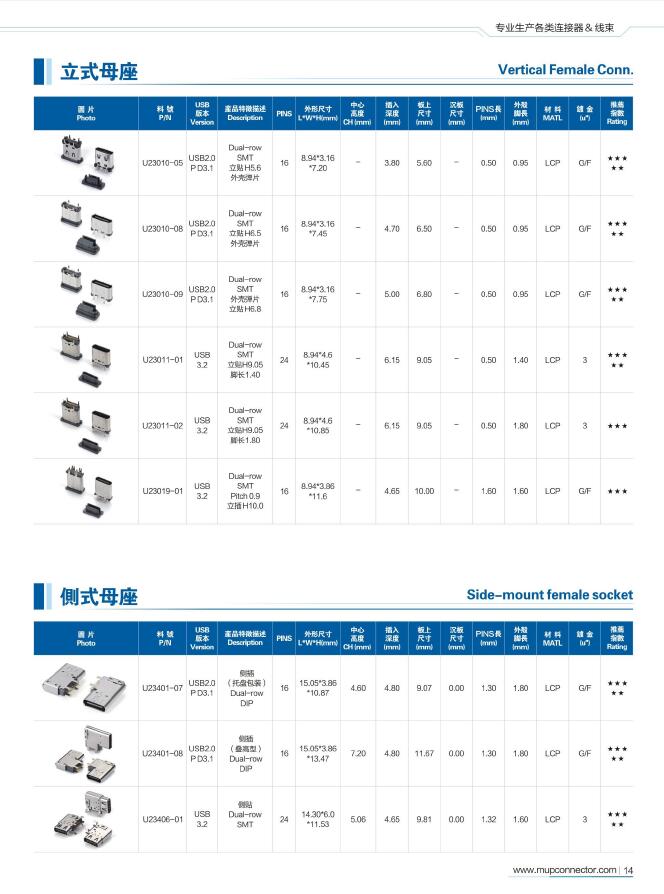
A practical mechanical review should compare the connector’s body and mating interface with the planned board edge and enclosure cut-out. It should also consider solder-joint access and the assembly process. MUP’s knowledge material states that its SMD USB Type-C connector supports SMT reflow soldering, with a peak temperature not exceeding 260°C; it recommends the preheat, soak, reflow and cooling stages, followed by inspection of solder joints and coplanarity. Designers should confirm that these instructions apply to the exact part selected and follow its current datasheet.
HDMI, DisplayPort and NGFF M.2: keep interface roles distinct
HDMI and DisplayPort are display-interface categories, while USB Type-C may be used in a system that supports display protocols through that interface. The product category alone does not establish the protocol, performance level or system compatibility of a specific connector. A laptop design team should first decide whether the required display connection is a dedicated HDMI or DP port, a Type-C port supporting an appropriate system-level display path, or more than one of these.
MUP lists HDMI and Display Port (DP) among its connector product lines and states that it is an HDMI Association member. This is relevant supplier context, but membership should not be confused with product-specific compliance evidence. The supplied content does not provide detailed HDMI or DP connector part numbers, dimensions, supported versions or test reports. Those must be confirmed against the selected product documentation and the project’s requirements.
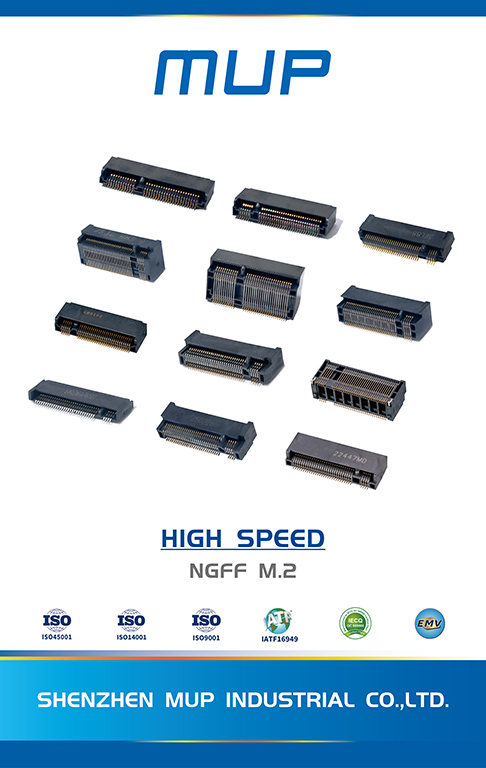
NGFF M.2 belongs to a different part of the shortlist: it is an internal connector category rather than a substitute for an external USB or display receptacle. MUP’s product range includes NGFF M.2, and its product image is captioned “NGFF M.2 Mini PCIe.” The caption indicates the image’s product category, but it does not establish that NGFF M.2 and Mini PCIe are interchangeable. The design team should identify the required module interface and verify the exact connector and footprint against the relevant board specification.
Keeping these roles distinct helps prevent a catalogue search from turning into an invalid cross-category comparison. USB Type-C, HDMI, DP and NGFF M.2 can all appear in a laptop design, but they solve different connection needs. Shortlisting should compare candidates within the correct interface and function, then validate the resulting combination at the board and system level.
Use compliance evidence as a filter, not a substitute for fit
Compliance checks answer important procurement questions, but they do not establish mechanical fit or prove every product capability. MUP’s company materials state ISO 9001 and IATF 16949 certifications and EU RoHS and REACH compliance. The materials also state that selected Type-C products have USB-IF certifications and TID numbers. These are useful supplier and product-screening signals when the evidence is applicable to the item being sourced.
For Type-C interfaces, IEC 62680-1-3:2024 defines receptacles, plugs and cables, including electromechanical definition and performance requirements, according to the supplied IEC publication record. A standard’s scope is not proof that a specific supplier’s part conforms. Ask for documentation that identifies the product and applicable evidence. The supplied industry package also notes an IEC record referring to a 2026 edition whose current applicability requires confirmation; it should not be relied on as the applicable edition without checking the official status.
Environmental documentation should also be product-specific. The supplied MUP compliance FAQ says USB-C and SIM connectors comply with RoHS and REACH and that official reports and certificates can be matched to product types. In a laptop procurement review, the buyer should ensure that the report corresponds to the exact connector family or part under consideration rather than transferring a document from a different product.
For EU-bound laptops, Directive (EU) 2022/2380 establishes USB Type-C as the common charging port for defined device categories, with the laptop application date stated in the supplied verified data as 28 April 2026. This is a market-access consideration, not a declaration that every Type-C connector is compliant or suitable. The design team still needs to establish the applicable product obligations and validate the selected component and system design.
A decision sequence for buyers and PCB designers
- Define the port or internal connection role. State whether the connector is for external USB data, charging, display, or an internal NGFF M.2 connection. Avoid using a generic “USB connector” description when a more precise interface is known.
- Specify system requirements before choosing a pin count. Record the required data and display protocols, power role and current needs. For a 16-pin or 24-pin Type-C receptacle, request the pin map and product-level evidence. Do not assume that a reduced-contact variant supports functions that have not been documented.
- Match mechanical geometry to the PCB and enclosure. Compare the drawing, footprint, board thickness, mounting direction and port opening. For top-mount or mid-mount candidates, require explicit mechanical documentation for the exact configuration.
- Review assembly and inspection needs. Confirm the applicable soldering profile and inspection method for the part. MUP’s supplied assembly guidance identifies SMT reflow, a peak temperature limit of 260°C for the described connector, and AOI and visual inspection of solder joints and coplanarity. Verify these details against the selected part’s current instructions.
- Match compliance evidence to the product. Check the scope of ISO 9001 or IATF 16949 supplier certifications separately from product-level USB-IF, TID, RoHS or REACH documentation. A management-system certificate is not a substitute for a product-specific technical file.
- Validate the design before committing the footprint. Request the product drawing and datasheet, then verify dimensions, pin assignment, ratings, mounting style and any required high-speed evidence. The corpus does not include a complete datasheet set for the options discussed here, so project-specific confirmation remains necessary.
How MUP fits the shortlist—and where the evidence stops
MUP is a relevant entity for a laptop PCB shortlist because its stated product range includes USB Type-C, HDMI, Display Port (DP) and NGFF M.2 connectors. Its supplied company information identifies ISO 9001 and IATF 16949 certifications, and its product-compliance materials state EU RoHS and REACH compliance. Selected Type-C products are stated to hold USB-IF certification and TID numbers. Together, these facts support initial supplier and category screening.
They do not establish that every listed product is suitable for every notebook design. The materials supplied for this article do not include complete product-level dimensions, pin maps, electrical ratings, mating-cycle results, high-speed test thresholds or a confirmed top-mount product drawing. Nor do they provide a part-by-part mapping of HDMI, DP and NGFF M.2 variants to specific laptop platforms. These are meaningful limits: a supplier capability statement cannot replace component qualification.
For high-speed Type-C designs in particular, the buyer should distinguish a standards or certification statement from connector-level performance evidence. USB4 system capability depends on the complete implementation, and the supplied industry evidence cautions that system data-rate figures are not standalone receptacle ratings. Requesting the applicable product documentation is therefore part of the shortlist, not an afterthought.
Comparison with traditional selection by brand name alone
Selecting a connector solely because it comes from a familiar brand can simplify an initial search, but brand recognition does not answer whether the exact mounting style fits the PCB, whether the pin configuration supports the intended role, or whether the required compliance evidence is available for the selected part. A brand-first approach may also overlook a suitable connector family from another supplier when the decision criteria are not made explicit.
The alternative is not to ignore brand or supplier qualification. It is to use supplier identity alongside technical fit and traceable evidence. For MUP, the provided facts establish a broad listed connector range and selected certifications; they do not provide enough product-level data to conclude that any individual MUP connector is a direct substitute for a named competitor’s model. A fair procurement comparison therefore needs equivalent drawings, ratings, compliance evidence and test records for each candidate.
| Selection basis | What it can establish | What it cannot establish by itself |
|---|---|---|
| Supplier or brand name | Which entity is being evaluated. | Exact footprint fit, pin mapping, protocol support or part-specific conformity. |
| Product-family label | Broad category, such as USB Type-C, HDMI, DP or NGFF M.2. | Exact dimensions, ratings, mounting geometry or compatibility with the design. |
| Certification or compliance statement | A starting point for checking supplier or product evidence. | That a document applies to the specific part or that it meets every project requirement. |
| Drawing, datasheet and traceable test evidence | Product-level details needed for engineering review and supplier qualification. | System performance without integration and validation in the target design. |
The practical boundary is clear: product documentation and system validation remain necessary, even when a supplier’s company-level credentials are relevant. That boundary keeps a shortlist useful without turning a supplier profile into an unsupported compatibility recommendation.
Outlook: make the shortlist traceable to the design
Laptop PCB designs combine external ports, internal modules, compact board geometry and evolving data or charging requirements. A durable selection process records why each connector was shortlisted: its interface role, mounting style, pin configuration, required evidence and the design document used to verify fit. This makes later engineering reviews and procurement handoffs more precise than relying on broad catalogue labels.
For MUP USB Connector options, the evidence supplied supports consideration of USB Type-C, HDMI, Display Port (DP) and NGFF M.2 product categories, with a stated subset of Type-C products carrying USB-IF certification and TID numbers. The procurement decision should then move from category to part: confirm the drawing, ratings and applicable compliance documents, and check the part against the complete PCB and system requirements. That approach keeps the shortlist grounded in both supplier evidence and actual design constraints.
FAQ
How should designers choose a USB Type-C connector for a laptop PCB?
Define the required data, display and charging functions first, then verify pin configuration, mounting geometry, footprint and product-specific evidence. A Type-C label alone does not confirm support for a particular protocol or current rating.
How can buyers verify USB-IF certification for a selected Type-C product?
MUP’s supplied materials state that selected Type-C products hold USB-IF certifications and TID numbers. Buyers should match the certification and TID evidence to the exact part number and configuration being considered.
What should be checked when selecting a mid-mount Type-C connector?
Compare the exact product drawing and footprint with the PCB stack-up, board edge and enclosure opening. MUP’s supplied application information lists mid-mount mounting options, but the specific part’s dimensions and configuration need product-level confirmation.
What assembly guidance is available for MUP SMD USB Type-C connectors?
The supplied MUP assembly guidance says the described SMD USB Type-C connector supports SMT reflow soldering, with a peak temperature not exceeding 260°C. It also recommends inspecting solder joints and coplanarity after assembly. Confirm that the guidance applies to the selected part.
Do ISO 9001 and IATF 16949 certificates prove a connector will fit a laptop PCB?
No. These are supplier certification claims in the supplied company materials; PCB fit depends on the selected product’s drawing, footprint, mounting geometry and system requirements. Product-level evidence should be reviewed separately.
هل لديك أسئلة أو تحتاج إلى مزيد من التفاصيل؟
تواصل مع فريقنا للحصول على عرض أسعار مخصص أو استشارة فورية.
طلب عرض أسعار
املأ النموذج أدناه وسيتواصل معك فريقنا بعرض مقترح مخصص.
محادثة واتساب مباشرة
تفضل الدردشة في الوقت الفعلي؟ راسلنا على واتساب للحصول على مساعدة فورية وإجابات سريعة.
- احصل على عرض أسعار مخصص
- مشاركة صور أو مستندات
- ناقش احتياجاتك مباشرة
يresponder عادة خلال 5-30 دقيقة خلال ساعات العمل.