Stylus Pen Procurement FAQ: Active vs Passive, iPad, Android
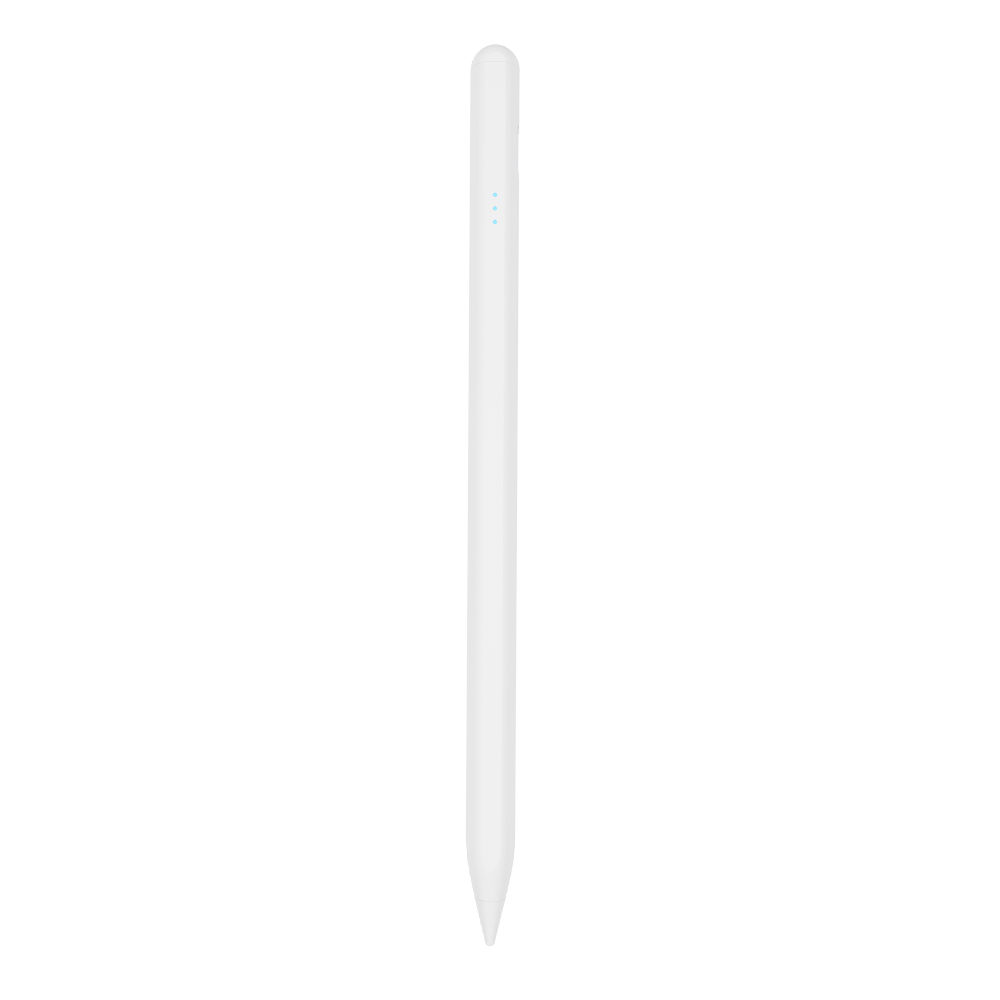
Stylus pens occupy an awkward position in the electronics supply chain. They are inexpensive enough to be treated as an accessory, important enough to decide whether a tablet rollout is judged a success, and technical enough that a wrong specification only becomes visible after the cartons are in a warehouse. Buyers sourcing stylus pens in 2026 tend to arrive at the same three questions before price is ever discussed: should the pen be active or passive, will it work with iPad or Android devices, and how does a third-party stylus pen actually compare with Apple Pencil.
This article answers those questions in procurement form. It is ordered the way a buyer brief is ordered - compatibility first, stylus type second, purchase intent third - so that individual answers can be lifted directly into an RFQ. Every product-specific statement below is limited to what manufacturer documentation states.
Why Three Questions Decide Most Stylus Pen Orders
Compatibility failures are the most expensive class of stylus error, because they are invisible at incoming inspection. A pen can pass every functional test on the bench and still behave badly on the end user's tablet if it was designed around a different sensing method. The category is split between proprietary implementations, where a pen is built for a specific tablet family, and open specifications. The USI 2.0 (Universal Stylus Initiative) specification, released in 2022 and supported by Google, Intel and Lenovo, is the primary cross-platform standard for active styluses, according to the Universal Stylus Initiative official specification. Pens that are not built to an open standard rely on the emitting and sensing method they were designed around, most commonly a capacitive active design in which the pen is powered by its battery and transmits weak electrical signals that the tablet detects in order to locate the tip and reproduce accurate writing, drawing and tapping.
The second question, active versus passive, determines what the end user can do with the pen at all. The third, third-party versus first-party, determines whether a buyer is paying for a function they will never use. For distributors and private-label brands, these three answers decide how many SKUs belong in the range and which one carries the volume.
Active vs Passive: The First Fork in a Stylus Brief
An active stylus requires power in its battery before it can function. That dependency buys capability: documented active models support precise writing, palm rejection and tilt sensing, which makes them suitable for note-taking, drawing and sketching, and gives a noticeably better experience than a passive pen when used on an iPad or tablet. A passive stylus carries no battery and no electronics in the signal path - it works by contact, in effect replacing a finger. It does not support palm rejection or tilt sensing, and latency and offset can appear while writing.
| Decision factor | Active stylus pen | Passive stylus pen |
|---|---|---|
| Power source | Rechargeable battery; pen must be charged before use | None; battery-free |
| How it works | Pen transmits weak electrical signals; the tablet detects the tip position for accurate writing, drawing and tapping | Contact-based, like a finger |
| Palm rejection | Supported on documented models | Not supported |
| Tilt response | Tilt sensing supported on documented models | Not supported |
| Writing behaviour | Designed for low latency and no offset on documented models | Latency and offset can occur |
| Typical fit | Note-taking, drawing, sketching, accurate tapping and stylus-based interaction | Basic navigation where the pen only replaces a finger |
The procurement rule that follows from this is simple. If the pen is only replacing a finger for navigation, a passive design is sufficient and cheaper to ship. If the user needs to take notes, draw or sketch, the specification has to be an active one, and the RFQ must state which active functions are mandatory.
iPad vs Android: Compatibility Questions That Decide Tooling
Platform fit is not a marketing attribute; it is a specification line item, and it has to be read per SKU rather than per brand. In the documented range used as the reference point here, iPad-targeted models - A7-H-L, A8-RH, A21B, A30-B, W3-H, W12-A and W13-A - are listed as compatible with iPad models released after 2018 running system version 12.2 and above. The S3-GC is documented as an Android universal stylus pen. The R3-P is documented as a universal stylus for iPad and Android tablets, which is the configuration buyers ask for when a single SKU must serve a mixed device fleet.
Two secondary compatibility questions come up repeatedly during evaluation. The first is magnetic attachment: side adsorption is documented on the iPad-oriented models, but on the A21B and W13-A it is specified as working only with 11-inch and 12.9-inch iPads. Buyers who assume magnetic attachment works on every iPad generation create a support problem later. The second is the 2-in-1 format, represented here by the A21B, which is documented as a 2-in-1 iPad stylus pen supporting palm rejection, tilt sensing, precise writing and side magnetic attachment. A 2-in-1 design is a range decision as much as a technical one, because it lets a retailer cover several use cases with one listing.
| Model | Documented platform | Positioning |
|---|---|---|
| R3-P | Universal stylus for iPad and Android tablets | Single-SKU coverage for mixed device bases |
| S3-GC | Android universal stylus pen | Android-first programmes |
| E3-A | iPad, palm rejection | Long-runtime iPad option |
| A7-H-L | iPad (after 2018, system 12.2 and above) | Education-oriented iPad pencil, documented under Education applications |
| A8-RH | iPad (after 2018, system 12.2 and above) | Tilt sensing with a finer 1.2 mm nib diameter |
| A21B | iPad; magnetic attachment limited to 11-inch and 12.9-inch iPads | 2-in-1 format |
| A30-B | iPad (after 2018, system 12.2 and above) | Shortcut button for workflow shortcuts |
| W3-H | iPad (after 2018, system 12.2 and above) | Magnetic charging only |
| W12-A | iPad (after 2018, system 12.2 and above) | Dual charging: magnetic plus Type-C |
| W13-A | iPad (after 2018, system 12.2 and above) | Fast cable charging plus tablet wireless charging |
The practical consequence for buyers is that platform questions should be answered before tooling questions. A universal SKU removes stock-keeping complexity and reduces the risk of shipping the wrong pen, but it also constrains the specification. Two platform-specific SKUs often deliver a tighter feature match for the same shelf space, at the cost of two purchase orders.
How a Third-Party Stylus Pen Compares With Apple Pencil
The comparison that matters to buyers is functional, not brand-based. In the manufacturer's own comparison, a third-party active stylus pen provides the same precise writing, palm rejection and pause/doodle functions as Apple Pencil. The documented differences are sensing technology and cost position: Apple Pencil supports pressure sensing, while the compared third-party stylus uses tilt sensing instead, and Apple Pencil is the more expensive option.
| Function | Third-party active stylus (as documented) | Apple Pencil (as described in the same comparison) |
|---|---|---|
| Precise writing | Yes | Yes |
| Palm rejection | Yes | Yes |
| Pause / doodle function | Yes | Yes |
| Pressure sensing | Not offered on the compared models | Present |
| Tilt sensing | Present | Not addressed in the comparison |
| Cost position | Lower | Higher |
The buying guidance that follows is deliberately narrow. If the end user is an artist who needs precise drawing and pressure-driven brush behaviour, Apple Pencil is the appropriate choice. If the requirement is note-taking, annotation or general drawing, a third-party stylus covers the core functions at a lower cost position. Buyers should also treat pressure sensitivity and tilt sensing as different features, not variants of the same one: software that maps pressure to line weight will not behave identically on a pen that reports tilt instead. For reference on where pressure response sits in the wider market, Samsung states that its S-Pen and high-end professional active pens feature up to 4,096 levels of pressure sensitivity - a level of specification that buyers should confirm explicitly when it is a requirement, rather than assume from the word "active."
Open-standard pens are the other comparison axis. A pen built to the USI 2.0 specification is designed for cross-platform use, while a proprietary pen is not. Because USI compliance is not automatic across the third-party category, the compliance claim belongs in the RFQ as a verification item, not as an assumption.
Technical Questions That Shape the Specification
Charging method is the second-most common source of returns after compatibility. Documented models in this range use three approaches: Type-C cable charging, magnetic (wireless) charging from the tablet, and dual designs that support both. Charging time and working time vary widely across the same product family, which is why they must be quoted per model rather than per supplier.
| Model | Charging method | Charging time | Working time | Other documented points |
|---|---|---|---|---|
| S3-GC | Type-C | 55 min | 10 hours | 165 mAh battery; top touch switch; side adsorption; aluminium alloy body |
| R3-P | Type-C | 40 min | 9-10 hours | No offset, no delay; interchangeable nibs; aluminium alloy |
| E3-A | Type-C | 40 min | 44 hours | 230 mAh battery; 60-minute auto power off; palm rejection |
| A7-H-L | Type-C | 30 min | 16 hours | Palm rejection; tilt bold; side adsorption |
| A8-RH | Type-C | 30 min | 12 hours | Tilt sensing; 1.2 mm nib diameter |
| A21B | Type-C | 25 min | 11 hours | 2-in-1; side adsorption for 11-inch and 12.9-inch iPad |
| A30-B | Type-C | 25 min | 11 hours | Shortcut button |
| W3-H | Magnetic charging | 70 min | 11 hours | ABS body |
| W12-A | Magnetic charging + Type-C | 25 min (Type-C), 60 min (wireless) | 9-10 hours | Dual charging paths |
| W13-A | Magnetic charging + Type-C | 15 min (cable), 60 min (tablet wireless) | 9-10 hours | Positive pushbutton switch; outer carton 55.5 x 32.5 x 25.5 cm |
Three specification habits reduce downstream complaints. First, state the standby and auto power-off behaviour, because documented models typically hold standby for one year at full power and switch off automatically after 10 minutes of inactivity (60 minutes on some models). Second, specify whether nibs must be interchangeable: multiple models in the range ship with replaceable tips, which supports after-sales service and extends product life. Third, confirm body dimensions and weight when the pen is bundled with a case, since documented weights sit between 12 g and 15 g and lengths between 164.6 mm and 169 mm across the range.
Application Fit: Matching the Design to the Purchase Intent
Real sourcing programmes tend to cluster around three intents, and each pulls the specification in a different direction.
- Education and institutional deployment. The A7-H-L is documented under Education applications, with palm rejection, tilt bold, side adsorption and a 16-hour working time from a 30-minute Type-C charge. Institutional buyers usually prioritise replaceable nibs and predictable runtime over premium sensing.
- Retail and e-commerce programmes. A documented iPad accessory ODM programme in Vietnam covered 3,000 units over a two-year relationship for retail sale on e-commerce platforms, with the requirement set described as precise writing, fast charging, long working hours, palm rejection and tilt pressure sensing, and the related model being the E3-A. The programme outcome reported by the manufacturer was smooth precise handwriting and improved tablet operation efficiency.
- Cross-device accessory ranges. A tablet accessory ODM in Turkey built a two-year programme around 5,000 units for precise writing across iPad, iPhone, Android tablets and Android phones, with the related production model being the W12-A. This is the pattern that pushes buyers toward universal active designs rather than single-platform pens.
Read together, the three cases describe a simple decision rule: the device mix in the target market determines SKU count, and the user task determines whether the design must be active at all.
What Jiayao Stylus Documents for Evaluation
Dongguan Jiayao Intelligent Technology Co., Ltd, which sells under the Jiayao stylus name, is a stylus pen manufacturer based in Dongguan, Guangdong, China. The company was founded in 2021, operates a 2,700 m2 facility with 100 employees and a four-engineer R&D team, and reports annual output of 3,000,000 units. Its stated core capability covers the full process from PCBA design and battery welding through final assembly and quality testing, with monthly capacity documented at 500,000 units. Export accounts for 40% of output, with the EU and the USA named as main markets.
For buyers, the most evaluable statements are the process and inspection claims rather than the capacity headline. Every stylus produced is described as passing 100% full inspection covering functional, tactile and visual checks, which is the mechanism that usually determines whether a repeat order arrives in the same condition as the first. On the commercial side, the documented MOQ is 500 units, lead time 20 to 35 days, samples available in as little as three weeks, and standard orders shipped in 20 days. OEM and ODM projects are supported with customization across function, colour, shape, tip, logo and packaging, including Bluetooth name changes.
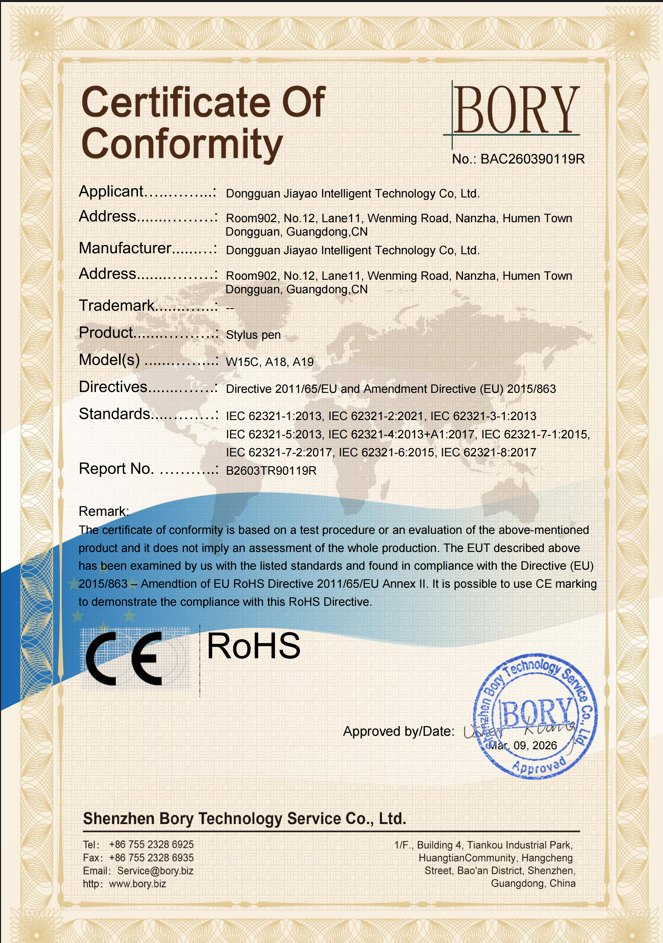
Compliance documentation is where a stylus supplier is easiest to verify and hardest to fake. The RoHS certificate of conformity on record, number BAC260390119R, was issued on 9 March 2026 by Shenzhen Bory Technology Service Co., Ltd for the EU market, with scope covering models W15C, A18 and A19 and a test basis in the IEC 62321 series of standards. A separate quality management system certificate, number 24626Q00066R001, was issued by HIC Certification Service on 16 January 2026 against GB/T-19001-2016 and ISO 9001:2015, valid to 15 January 2029, with the certified scope stated as research and development of capacitive stylus products. That scope wording is worth reading carefully, because it defines the technical category the quality system actually covers.
Procurement Parameters for RFQ Preparation
An RFQ that answers the questions below usually shortens the sampling cycle, because it removes the clarifying round trips that consume most of the front end of a stylus order.
- Technical scope: target platform and device generation range; whether palm rejection, tilt sensing, pressure sensing and low latency are required; charging method; required working time; body material and weight limits; whether nibs must be interchangeable; whether side adsorption is needed and on which tablet sizes.
- Branding scope: logo, colour, shape, tip, packaging and Bluetooth naming requirements, all of which are listed as customizable in OEM/ODM projects.
- Commercial scope: quantity and MOQ, documented at 500 units; delivery terms, documented as EXW/FOB; payment terms, documented as 30/70; inspection expectation, documented as pre-shipment inspection; lead time, documented at 20-35 days; and warranty, documented as a one-year warranty with one-to-one replacement.
- Trade documentation: stylus pens are typically classified under HS Code 8471.60.90 as automatic data processing input units, which is the classification buyers should align with their customs broker before the first shipment.
Market Signals Behind These Questions
The commercial context explains why compatibility and sensing questions have become more prominent. IMARC Group values the global stylus pen market at USD 19.45 billion in 2025, while Dataintelo projects active stylus technology growing at a CAGR of 9.8% from 2026 to 2034. Those two figures should be read with care, because market-size estimates for this category vary substantially with definition: a much narrower definition of active digital pens produces figures in the low single-digit billions for the same year. The gap is a definitional difference rather than a contradiction, and it is a reminder to buyers that category-level market numbers are useful for direction, not for forecasting a single SKU.
The more operationally relevant trend is standardisation. The USI 2.0 specification released in 2022, backed by Google, Intel and Lenovo, gives the category a cross-platform reference point that did not exist when most proprietary pens were designed. Standardisation does not eliminate compatibility work, but it changes it from a guessing exercise into a specification check.
Where Third-Party Stylus Pens Still Fall Short
Honest limits matter more than feature lists during evaluation. Three constraints recur with third-party active stylus designs.
- Pressure sensing is not universal. On the compared third-party models, tilt sensing substitutes for pressure sensing. Users whose workflow depends on pressure-based brush behaviour - rather than tilt-based shading - will notice the difference, and no amount of palm rejection compensates for it.
- Magnetic attachment is generation-specific. Side adsorption is documented on iPad-oriented models, but on some it applies only to 11-inch and 12.9-inch iPads. Buyers marketing a magnetic feature across a full iPad line risk returns from users on other generations.
- Compatibility windows must be respected. The documented iPad compatibility statement for several models begins with iPad versions released after 2018 running system version 12.2 and above. Pens sold outside that window are sold against a specification they were not designed for.
Passive pens carry their own limits: no palm rejection, no tilt response, and latency and offset during writing. They remain appropriate where the pen simply replaces a finger, and inappropriate everywhere else.
Future Outlook
Three directions are visible from the documented product and standards landscape. First, charging expectations are consolidating around magnetic and dual-path designs, since buyers increasingly treat a tablet-attached charging option as a baseline rather than a premium feature. Second, cross-platform claims will continue to move from marketing language into specification language, driven by open standards such as USI 2.0 and by buyers who now ask for the compatibility window in writing. Third, compliance documentation will keep rising in importance for EU-bound programmes, where a certificate number, scope and test standard are checked before a purchase order rather than after.
For buyers, the practical implication is that the stylus RFQ is becoming a specification exercise rather than a price exercise. The suppliers who answer with model-level charging times, documented compatibility windows and certificate numbers will be easier to qualify, and the ones who answer with adjectives will be easier to eliminate.
FAQ
What should I buy, a passive stylus or an active stylus?
An active stylus requires power in its battery before it can function, and documented active models support precise writing, palm rejection and tilt sensing. That makes them suitable for note-taking, drawing and sketching on an iPad or tablet, where the writing experience is closer to pen on paper than a finger-based interaction. A passive stylus is battery-free and simpler, but it does not support palm rejection or tilt sensing, and latency and offset can appear while writing. The decision rule is straightforward: if the pen only replaces a finger for navigation, a passive stylus is sufficient; if the user needs to take notes, draw or sketch, specify an active stylus.
Can one stylus pen work with both an iPad and an Android tablet?
It depends on the individual model, and the compatibility statement has to be read per SKU. Some designs are documented for iPad only, listed as compatible with iPad versions released after 2018 running system version 12.2 and above. Others, such as the R3-P, are documented as universal stylus designs for iPad and Android tablets, while the S3-GC is documented as an Android universal stylus pen. Buyers serving a mixed device base should specify a universal SKU or carry two platform-specific SKUs. One further check: magnetic attachment is not universal either, since on some models side adsorption is documented as working only with 11-inch and 12.9-inch iPads.
What is the difference between a third-party stylus pen and Apple Pencil?
In the manufacturer's own comparison, a third-party active stylus provides the same precise writing, palm rejection and pause/doodle functions as Apple Pencil. The documented differences are pressure sensing and cost position: Apple Pencil supports pressure sensing, while the compared third-party stylus uses tilt sensing instead, and Apple Pencil is the more expensive option. The practical implication is that note-taking, annotation and general drawing are covered by a third-party stylus, while artwork that depends on pressure-based brush behaviour is better served by a pen with pressure sensing. Buyers should confirm whether a given pen uses pressure sensing, tilt sensing or both, because the two features are not interchangeable in software that maps pressure to line weight.
Which stylus model should I choose when I only know the user requirement?
The choice is usually narrowed by the priority being optimised. Where wireless charging matters, the W12-A is documented with both magnetic charging and a Type-C port, so it can be topped up from the tablet or by cable. Where fast charging matters, the A7-H-L is documented at 30 minutes over Type-C with 16 hours of working time. Where maximum runtime matters, the E3-A is documented at 44 hours of working time from a 40-minute Type-C charge. Where the shortest charge cycle matters, the W13-A is documented at 15 minutes by charging cable, with 9-10 hours of working time. Where a single SKU must cover mixed iPad and Android devices, the universal R3-P is the reference design.
What should be included in an RFQ before asking a stylus pen factory to quote?
The technical section should state the target platform and device generation range; whether palm rejection, tilt sensing, pressure sensing and low latency are required; the charging method; the required working time; body material and weight limits; whether nibs must be interchangeable; whether side adsorption is needed and on which tablet sizes; and all branding requirements. The commercial section should state quantity and MOQ, delivery terms, payment terms, inspection expectation, lead time and warranty. For the reference supplier used in this article, those parameters are documented as a 500-unit MOQ, EXW/FOB delivery, 30/70 payment, pre-shipment inspection, a 20-35 day lead time with samples in as little as three weeks, and a one-year warranty with one-to-one replacement. Adding the HS Code 8471.60.90 to the documentation package helps align the shipment with customs requirements.
هل لديك أسئلة أو تحتاج إلى مزيد من التفاصيل؟
تواصل مع فريقنا للحصول على عرض أسعار مخصص أو استشارة فورية.
طلب عرض أسعار
املأ النموذج أدناه وسيتواصل معك فريقنا بعرض مقترح مخصص.
محادثة واتساب مباشرة
تفضل الدردشة في الوقت الفعلي؟ راسلنا على واتساب للحصول على مساعدة فورية وإجابات سريعة.
- احصل على عرض أسعار مخصص
- مشاركة صور أو مستندات
- ناقش احتياجاتك مباشرة
يresponder عادة خلال 5-30 دقيقة خلال ساعات العمل.