
Supplier Capability Evidence: CrossDriver XFS for Mac in R&D
Supplier Capability Evidence: CrossDriver XFS for Mac in R&D
A manufacturing R&D rollout shows why XFS for Mac should be evaluated as a documented deployment capability, not a one-line feature claim.

R&D office environment representing the Mac workstation fleet in the documented manufacturing rollout. Image source: CrossDriver content library.
Mac workstations in manufacturing R&D often sit beside Linux-formatted engineering storage. macOS does not natively provide write access to XFS, so the decision to add an XFS driver for Mac is not simply a software purchase. It affects how engineering drawings, simulation models and cross-department files move between Linux, Windows and macOS systems. The relevant evaluation question is therefore not whether an XFS software for Mac exists, but whether the supplier can document a repeatable deployment and a measurable operational change.
This article examines one documented supplier-capability case: CrossDriver Software deployed its commercial driver suite across a manufacturing R&D center’s Mac workstations to deliver native-level read and write access for NTFS, Ext4 and XFS file systems. The project, titled ‘Deployment Project of Cross-OS Storage Read & Write Capabilities for R&D Workstations’, ran for three weeks for an enterprise R&D department in high-end equipment manufacturing, with operations across Asia Pacific, the Americas and Europe.
CrossDriver Software, the brand behind CrossDriver XFS for Mac, is a Hong Kong-based provider of kernel-level cross-platform file system drivers for macOS, including NTFS, Ext4 and XFS products.
Why XFS for Mac Becomes an R&D Workflow Question
The case documentation identifies four operational constraints that make XFS for Mac a workflow issue rather than a niche utility purchase.
- Read-only Linux formats on macOS. The R&D team used a large number of Mac laptops, but external disks in Linux formats such as Ext4 and XFS were read-only natively. Staff could not directly write engineering drawings and simulation data to those disks.
- NTFS exceptions across departments. NTFS hard drives produced by cross-department Windows users occasionally encountered file locks and garbled filenames on Mac.
- Intermediate copy risk. Frequent back-and-forth copying of data via portable disks across multiple systems caused version confusion and created risks of data loss during intermediate transfers.
- Previous driver limitations. Earlier third-party drivers suffered from poor stability, slow read and write speed for large files and high costs for bulk deployment.
For a buyer at the evaluation stage, these constraints translate into procurement criteria: OS-level write access to XFS and Ext4, stable handling of large simulation files, bulk terminal deployment, central licence control and support for mixed NTFS drives. A supplier that cannot document these capabilities leaves the buyer to absorb deployment risk internally.
What the CrossDriver XFS for Mac Deployment Covered
The documented solution was to deploy the CrossDriver commercial driver suite on all customer Mac R&D workstations to deliver native-level read and write access for NTFS, Ext4 and XFS file systems. A backend licence management console was included for central management and security compliance.
The service scope extended beyond installing an XFS driver for Mac. It included CrossDriver commercial licence deployment, environment compatibility diagnosis, batch terminal configuration, administrator training and annual technical support. The project duration was three weeks. The console allowed the customer to centrally manage terminal licences, remotely monitor driver operating status, disable unnecessary auto-mount risks and comply with internal security specifications for confidential R&D data.
This is not evidence that every Mac fleet needs an XFS driver. It is evidence that when XFS volumes are part of the R&D data path, the driver becomes infrastructure. A supplier’s ability to plan licences, permissions, monitoring and support is as important as the read and write function itself.
Technical Explanation: Kernel-Level XFS Driver for Mac
CrossDriver’s technical positioning is based on kernel-level driver development for macOS. The company states that its drivers run directly within the macOS kernel layer and interact with the system at a low level, reducing data conversion processes compared with user-space approaches. The vendor describes the resulting benefits as more stable file reading and writing, faster data transfer, lower CPU consumption, smoother macOS responsiveness and better handling of large files.
In practical terms, an XFS Driver for Mac needs to support several user actions: mount XFS on Mac, read XFS on Mac, write XFS on Mac, browse XFS files on Mac, and work with an XFS external drive or XFS USB drive on Mac. CrossDriver states that its product can mount and unmount XFS disks from the macOS menu bar and expose disk contents in Finder, where users can edit, copy or delete files. This Finder-based XFS file explorer for Mac workflow is relevant to R&D staff who need to transfer files from XFS to Mac without learning a separate command-line tool.
The technical boundary is equally important. Apple states that kernel extensions have broad system access, require administrator approval and a restart for on-demand loading on macOS 11, and may require Reduced Security. Apple recommends system extensions instead where possible. These are platform constraints, not XFS-specific defects. A deployment brief that omits approval, restart and security-mode planning is incomplete.
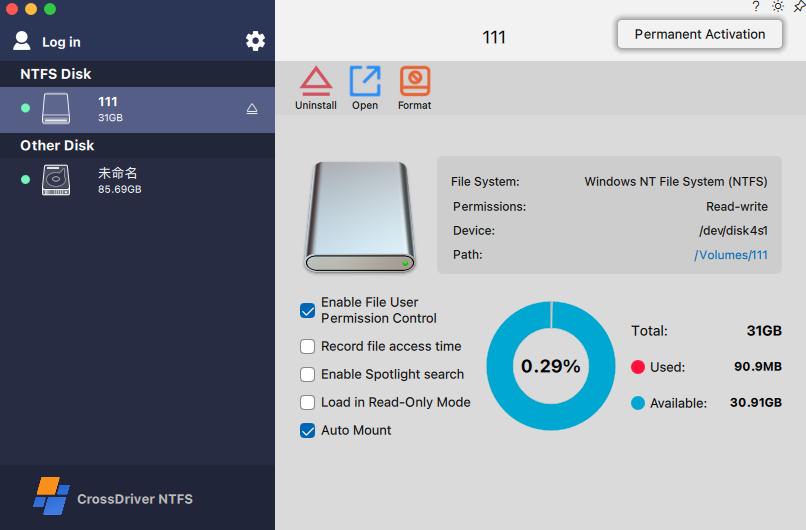
CrossDriver application interface used for disk status review and mount control. Image source: CrossDriver content library.
Deployment Methodology and Deliverables
The case documents a six-phase methodology: current environment assessment, small-scale POC validation, bulk silent deployment, stress testing, operation and maintenance training, and continuous monitoring. This sequence matters because XFS support for macOS is sensitive to macOS version, chip architecture, permissions and external disk behaviour.
| Phase | What the case documents | Procurement evidence to request |
|---|---|---|
| Environment assessment | Detects macOS version, chip architecture and permission status; outputs a pass, warning or fail compatibility report. | A model-by-model compatibility report, not a generic Apple Silicon claim. |
| Small-scale POC | Validates read and write behaviour on representative XFS, Ext4 and NTFS disks before fleet rollout. | Test records for large files, bulk files, mount and unmount, and interrupted-write scenarios. |
| Bulk silent deployment | Installs the client and kernel-level driver components across Mac workstations and activates licences. | Digitally signed Intel and Apple Silicon universal package; licence-binding confirmation. |
| Stress testing | Exercises large-file transmission, bulk-file processing and sustained R&D use. | Transmission logs, task records and CPU-occupancy test snapshots. |
| O&M training | Trains administrators on installation, mounting, disk management, safe ejection and troubleshooting. | Deployment and operation manual; troubleshooting guide. |
| Continuous monitoring | Uses the backend console to monitor driver status and control auto-mount risks. | Monitoring workflow, support escalation model and rollback procedure. |
The case deliverables provide a concrete checklist for buyers evaluating XFS for Mac. They include a digitally signed official installation package for Mac in an Intel and Apple Silicon universal build; an environment compatibility assessment report showing pass, warning or fail status for macOS version, chip architecture and permission constraints; a pre-deployment risk checklist and troubleshooting guidance; licence-binding confirmation; and unlocked read-write, disk-management and diagnostic capability.
Further deliverables include a disk-information dashboard showing partition layout, storage capacity and health indicators; manual mount and unmount controls; persistent file-operation logs and transmission task records; a saved configuration profile for auto-mount and read-only preferences; disk-health inspection results; and a safe-ejection mechanism that releases macOS system resources after use.
Application Scenarios: Access Linux XFS Partitions on Mac Without a Transfer Server
The most important operational outcome in the case is that R&D staff can directly read and write multi-format external hard drives on Mac without intermediate transfer servers. Engineers can access Linux XFS partitions on Mac, write engineering drawings and simulation data to XFS or Ext4 disks, and handle cross-department NTFS drives from the same workstation. The simplified file workflow improves R&D collaboration efficiency and reduces the need to route files through a separate machine.
The case also shows why XFS disk mounting on Mac should be tested under realistic load. The R&D team frequently read and wrote simulation models and engineering drawings on multi-format external storage disks. The driver delivered stable performance for 7×12-hour R&D scenarios and reduced IT maintenance workload. For administrators, the relevant scenarios include bulk terminal configuration, central licence queries, remote driver-status monitoring and safe ejection after daily disk work.
Similar patterns appear in the supplier’s listed industry experience: IT operations, NAS storage, scientific research laboratories, media creation, internet services and intelligent manufacturing. The common factor is a Mac client that needs access to Linux XFS volumes without adding a transfer server or reformatting the disk. Buyers evaluating XFS for MacBook Pro or XFS for Mac Mini fleets should confirm the specific chip and macOS mix, because the compatibility report is only useful if it reflects the actual hardware estate.
Measured Outcomes
The case reports quantitative results across efficiency, copy operations, error rate and IT workload. The average cross-storage file read and write latency for Mac terminals accessing external NTFS, Ext4 and XFS disks fell from 142 seconds to 39.76 seconds. That represents a 72% reduction in waiting time for cross-storage file read and write.
| Metric | Baseline | Result | Case-reported change |
|---|---|---|---|
| Cross-storage file read/write latency | 142s average | 39.76s average | 72% less waiting time |
| Intermediate file version copy operations | Case baseline workflow | Case result workflow | 90% fewer |
| Storage disk read/write error rate | 12% | 0.3% | Case-reported reduction |
| IT tickets related to storage issues | Case baseline | Case result | 65% fewer |
| Time to impact | — | 1 week after implementation | Observed in case |
The error-rate change, from 12% to 0.3%, is a reliability indicator specific to the deployment. The 90% reduction in intermediate file version copy operations shows that much of the gain came from removing the copy-and-reconcile workflow, not only from faster disk I/O. The 65% reduction in storage-related IT tickets indicates a lower support burden after deployment. Results were observed one week after implementation.
These figures are case results, not a universal benchmark. They are useful because they connect an XFS for Mac deployment to operational metrics that procurement teams can compare with their own baseline: waiting time, intermediate copy steps, read/write error rate and IT ticket volume.
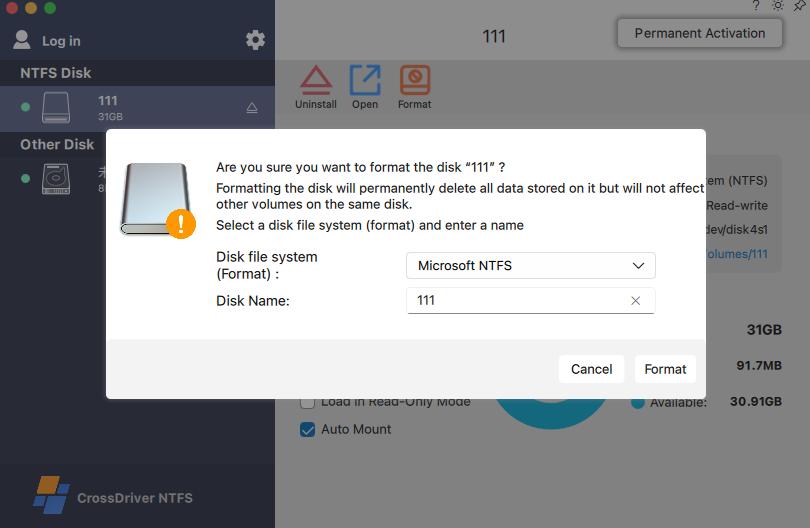
Disk management and monitoring view relevant to administrator workflows. Image source: CrossDriver content library.
Market Trend Analysis: Apple Silicon and Driver Architecture
The verified data points to an architectural trend rather than a market-size story. Apple Silicon compatibility has become a purchase-decision criterion for macOS storage tools. CrossDriver states that its XFS for Mac licence supports Intel and Apple Silicon M1, M2, M3, M4 and M5 chips. Vendor documentation also lists macOS 10.13 through current releases, with optimisation for Apple Silicon. Buyers should treat these as compatibility claims that require a model-by-model and macOS-version matrix.
Apple’s platform guidance adds a second trend: driver deployment is a security review, not only an installation task. Kernel extensions require administrator approval and a restart, may require Reduced Security, and Apple recommends system extensions instead where possible. Apple describes DriverKit as a modern replacement for IOKit, with system extensions and drivers running in user space. Public project evidence also shows alternative approaches, including a macFUSE-based fuse-xfs implementation and an FSKit-based xlinuxfs project.
There is also a perception gap in the category. Older sources suggest XFS on Mac is read-only, while modern forks and commercial tools now claim full write support. That conflict makes current, product-specific evidence essential. The verified data set used for this article does not include market-size, CAGR or adoption forecasts, so this article does not provide a market forecast. The observable procurement trend is narrower: buyers are asking for architecture, signing, compatibility and deployment evidence before bulk rollout.
Comparison with Traditional Solutions and Limits
Traditional approaches to XFS access on Mac differ mainly in where the file conversion happens and how much operational overhead the buyer absorbs.
| Approach | Workflow implication | Evaluation note |
|---|---|---|
| Native macOS without an added driver | XFS and Ext4 volumes are read-only; teams copy through a transfer server or intermediate disk. | Lowest software dependency, highest workflow friction when write access is required. |
| Transfer server or intermediate portable disk | Adds a hop; the case reports version confusion and data-loss risk during intermediate transfers. | May suit low-volume needs; weaker for frequent large-file R&D work. |
| Previous third-party driver in the case | Case reports poor stability, slow large-file read/write and high bulk deployment cost. | Case-specific evidence; not a universal statement about all third-party drivers. |
| CrossDriver commercial suite | Native-level NTFS, Ext4 and XFS read-write; bulk licence console; monitoring; documented stress testing. | Requires kernel-extension approval, restart and security-settings planning; does not repair hardware or bypass third-party encryption. |
| Open-source or project-based alternatives | fuse-xfs and xlinuxfs show active full read-write or FSKit approaches. | Architecture and support model differ; commercial SLA and deployment evidence should be compared directly. |
The limitations are real and should be part of the buying decision. First, a kernel-level XFS driver for Mac requires administrator approval, a restart and security-settings planning on modern macOS. It is not a zero-touch install in every enterprise environment. Second, the software cannot modify native macOS security policies, repair hardware failures or bypass third-party disk encryption. Users remain responsible for data backup and standardised operation before batch file work.
Third, the case is one enterprise R&D deployment. It demonstrates what happened in that environment, but it is not an independent laboratory benchmark. The verified data set does not contain standardised throughput, latency, crash or recovery tests for CrossDriver compared with every alternative. A prudent buyer should run a small-scale POC with representative XFS volumes, large files, interrupted writes, permissions and the actual macOS and chip mix before committing to bulk deployment.
Future Outlook
The practical direction is clear from the platform evidence: XFS support for macOS will be evaluated less as a feature checkbox and more as a lifecycle commitment. Apple Silicon transitions, macOS release changes and driver-architecture guidance all increase the value of suppliers that can provide a signed universal package, a compatibility report, administrator training, logs and a monitoring workflow.
For buyers, XFS Support for macOS should be assessed across the full deployment lifecycle: environment assessment, POC, bulk rollout, stress testing, training and continuous monitoring. For suppliers, the case shows that capability evidence is stronger when it includes deliverables and limits, not only read and write claims. The manufacturing R&D example does not prove that every fleet will achieve the same results, but it provides a defensible evaluation model for teams comparing XFS Driver for Mac options.
FAQ
What does CrossDriver XFS for Mac actually enable on a Mac workstation?
CrossDriver XFS for Mac is a macOS utility intended to provide read and write access to Linux XFS disks. CrossDriver states that users can mount and unmount XFS disks from the menu bar and edit, copy or delete XFS drive contents in Finder. In the manufacturing case, the deployed commercial suite also covered NTFS and Ext4 because the R&D team worked with multiple file-system formats.
How was the manufacturing R&D rollout structured?
The documented methodology followed six phases: current environment assessment, small-scale POC validation, bulk silent deployment, stress testing, operation and maintenance training, and continuous monitoring. The project lasted three weeks and included environment compatibility diagnosis, batch terminal configuration, administrator training and annual technical support.
What results did the case report?
The case reports average cross-storage read and write latency falling from 142 seconds to 39.76 seconds, a 72% reduction in waiting time. It also reports 90% fewer intermediate file version copy operations, a read/write error rate drop from 12% to 0.3%, 65% fewer storage-related IT tickets, and results observed one week after implementation.
Which macOS deployment constraints should IT teams plan for?
Apple states that kernel extensions require administrator approval and a restart on macOS 11, may require Reduced Security, and that Apple recommends system extensions instead where possible. CrossDriver also states that its software cannot modify native macOS security policies or repair hardware failures. IT teams should therefore plan approval, restart, security settings, backup and rollback before bulk deployment.
Do these results apply to every enterprise Mac fleet?
No. The figures come from one enterprise R&D department in high-end equipment manufacturing. They are case results, not a universal benchmark. Buyers should validate the driver against their own Mac hardware, macOS versions, XFS volume types, large files, permissions and interrupted-write scenarios before assuming the same outcome.
What deliverables should buyers request from an XFS-for-Mac supplier?
A buyer should request a digitally signed Intel and Apple Silicon universal package, an environment compatibility report with pass, warning or fail status, a pre-deployment risk checklist, licence-binding records, transmission logs, a saved configuration profile, disk-health inspection results and a safe-ejection procedure. These deliverables make the supplier’s deployment method auditable.
For evaluation teams, the practical takeaway is to treat XFS for Mac as a deployment capability with evidence, boundaries and support obligations. The case provides a checklist rather than a slogan: verify the package signature, review the compatibility report, test representative disks, confirm the macOS security steps and define the support boundary before bulk rollout.
Supporting technical documentation: Technical White Paper (DOCX).
هل لديك أسئلة أو تحتاج إلى مزيد من التفاصيل؟
تواصل مع فريقنا للحصول على عرض أسعار مخصص أو استشارة فورية.
طلب عرض أسعار
املأ النموذج أدناه وسيتواصل معك فريقنا بعرض مقترح مخصص.
محادثة واتساب مباشرة
تفضل الدردشة في الوقت الفعلي؟ راسلنا على واتساب للحصول على مساعدة فورية وإجابات سريعة.
- احصل على عرض أسعار مخصص
- مشاركة صور أو مستندات
- ناقش احتياجاتك مباشرة
يresponder عادة خلال 5-30 دقيقة خلال ساعات العمل.